When the Free Form Stops Working for You
In the beginning, it made perfect sense. You were a freelancer, or running something small, and you needed a clean way to collect details from new clients. So you opened a free Google Form, dropped in a few fields, and sent the link. It worked. The answers came in, the project started, and you didn't think twice about it.
And why would you? It was the obvious move. Free, fast, no manual to read, no account to configure. You had a form live in ten minutes and never paid a cent. If you'd asked yourself back then whether this was the right tool, the question would have felt almost silly — of course it was.
Lately, though, something has started to feel off. You might not have put words to it yet, but the smooth part is gone. The form still submits; the friction lives everywhere else.
It shows up in the small things first. A spreadsheet where every row is an island — no thread connecting one client's submission to the last one, no sense of who's at what stage. Files land wherever they land: some in your inbox, some in a drive, a couple you're fairly sure exist but can't find right now.
Then there's the relationship side. You're emailing a client for the third time about the one field they skipped. And when they email you asking where things stand, there's no page you can point them to — no status they can check on their own. Every update runs back through you.
Here's the thing worth naming: the form didn't fail. The work changed shape. What started as "collect a few details" quietly became "manage an ongoing relationship" — and you're still running it on a tool that never changed at all.
Which is where a quieter idea comes in. Free and enough are not the same word. Once you see that, cost stops being the question, and something more useful takes its place: is it time to graduate from a form to a client portal?
That's what this piece is here to help you decide. Not to push you one way — but to give you a fair, honest way to weigh it. So let's look at both sides.
First, Get Clear on What You're Actually Trying to Do
Before you line up two tools and start ticking boxes, it helps to build the scorecard first. The trap is picking a winner based on which one is cheaper, or which one you can stand up in an afternoon. That tells you almost nothing about whether it will actually do the job. The right answer isn't the tool with the friendliest price tag — it's the one that fits the work you're doing every day. So let's agree on how we'll judge them before we judge either one.
Here are the five things worth measuring, and we'll hold both options to exactly the same standard.
The first is data quality. When a submission lands in your lap, is it clean and structured, or is it a wall of free text you have to untangle by hand? A tool that forces good input up front saves you hours later.
The second is what happens the moment someone hits submit. Does the request route itself to the right person? Does anything follow up on its own? Can you see its status at a glance and move it through review — or does everything stall until you remember to check?
The third is the experience on the client's side. This is the part they actually touch, so it matters more than people admit. Does filling it out feel smooth and professional, or clunky enough to make them wonder whether you've got your act together?
The fourth is how files and sensitive data are handled. Uploads pile up fast, and some of what you collect is confidential. You want it organized without babysitting, and secure without a compliance headache.
The fifth is whether it holds up as things grow. A setup that works for ten submissions a month can buckle at two hundred, especially once a whole team is working in it at the same time. What happens under load, and when more hands get involved, tells you a lot.
Notice what's not on that list: cost and setup speed. That's deliberate. Those two matter — nobody's pretending otherwise — but they're the entry fee, not the deciding vote. Almost any tool worth considering clears that bar. Treat them as the price of getting in the room, then let the five dimensions above decide who actually wins it.
With the scorecard set, the comparison gets a lot fairer. In the next section we'll run each option through these same five questions, one at a time, and see where each one holds up and where it quietly falls short.
Giving Google Forms a Fair Trial
Before we tally the marks against it, Google Forms deserves an honest hearing. So let's run it through the same scorecard we just laid out, feature by feature, and give credit exactly where the tool earns it.
Its first strength is the most obvious one: it is genuinely free, with no asterisk waiting in the fine print, no seat count that quietly caps you, no upsell that unlocks the part you actually needed. And it is fast. You can open a blank form and have something usable in minutes, with no training, no onboarding, and no specialist to call. If you can type a question, you can build a form.
The strengths carry over to the people filling it out, too. The interface is familiar to nearly everyone who has ever touched the web, so there is no hesitation, no puzzling over how it works, no half-finished submissions abandoned out of confusion. Responses then drop straight into clean, tidy spreadsheet rows, ready to sort, filter, or hand off — no manual re-keying, no reformatting.
Put those together and the sweet spot comes into focus. Google Forms is ideal for simple, one-directional collection: a survey, a sign-up, an RSVP, a quick intake — any moment where you just need the data once and you are done. For that job, honestly, little else is worth the extra effort.
But every tool has a ceiling, and this is where that same clean design stops keeping up.
The root limit is baked into what Google Forms is: a one-way capture tool. It takes information in and sets it down, and that is the whole story. It has no memory of the person on the other end — no sense that this submission and last month's came from the same client, no thread connecting one interaction to the next. Each form is an island.
From that single limit, the practical gaps follow. There is no automatic routing to send a response to the right person, and no built-in follow-up to nudge, confirm, or move things forward — every next step is manual. There is no status the client can check for themselves, so they are left in the dark, and you are left fielding "did you get my form?" emails. File handling is another weak point: uploads and documents are supported only in a limited, clumsy way, awkward the moment attachments matter.
And so the breaking point arrives predictably. The instant real back-and-forth enters the picture — questions, clarifications, revisions — or approvals need to be tracked, or several projects run at once, the tool strains and then simply breaks.
None of this is a flaw to hold against Google Forms. It is the natural edge of what it was built to do, and it does that narrow job admirably. The tell is only this: the moment your work becomes a relationship rather than a single transaction — one that lives across submissions, with steps to move through and progress to see — you start reaching for something built for exactly that.
A Client Portal: Built for the Relationship, Not Just the Submission
Now run the client portal through the exact same scorecard, holding it right up against the form so nothing gets graded on a curve.
The difference shows up before you've filled in a single field. A portal doesn't treat intake as a box to be emptied and forgotten; it treats that first submission as the opening move of a relationship that keeps going — a two-way workflow rather than a one-time collection event.
Start with the intake itself. It's still structured, still asks for exactly what you need, but every answer lands against a persistent client record. A submission isn't an orphaned file sitting in a folder somewhere; it's the newest entry in a history you can scroll back through. Last quarter's brief, the revised scope from March, the document they swore they'd already sent — all of it lives in one continuous thread.
Then there's status. The client can see where their submission stands without emailing to ask: received, in review, waiting on them, approved. That one feature quietly retires the entire genre of "just checking in" messages, because nobody has to chase and nobody has to be chased. The chasing was never the work anyway — it was the tax you paid for not having a system.
Above that sits the shared workspace. Instead of scattering a relationship across inboxes and personal drives, everything for a given client — or a given project — has a single home. You open one space and the whole engagement is there, not reassembled from six different threads every time someone needs to find something.
File exchange works the same way, only it's organized and it's safer. Documents move through a controlled channel with real access rules, not as attachments forwarded around until nobody's sure which version is current or who still has a copy. For anything sensitive, that gap between a proper portal and a pile of email attachments isn't cosmetic — it's the difference between a locked room and a shoebox.
And running underneath all of it is a review or approval flow: submissions get routed, checked, signed off, each step happening in the background without a chain of manual handoffs. The client sees none of the machinery — just a clean, branded, professional surface that looks like you meant it, because you did.
Notice how little of that had anything to do with the form. The value of a portal isn't a prettier intake screen; it's continuity. It's everything that happens after someone hits submit — the record that persists, the status they can trust, the workspace that holds the thread, the handoffs that don't drop on the floor. A form ends the moment it's sent. A portal is really just getting started.
So now we have both tools measured on identical terms — same scorecard, same questions, no home-field advantage for either. Which means we can finally do the thing this whole comparison was built for: set them down side by side and see, honestly, what each one is actually for.
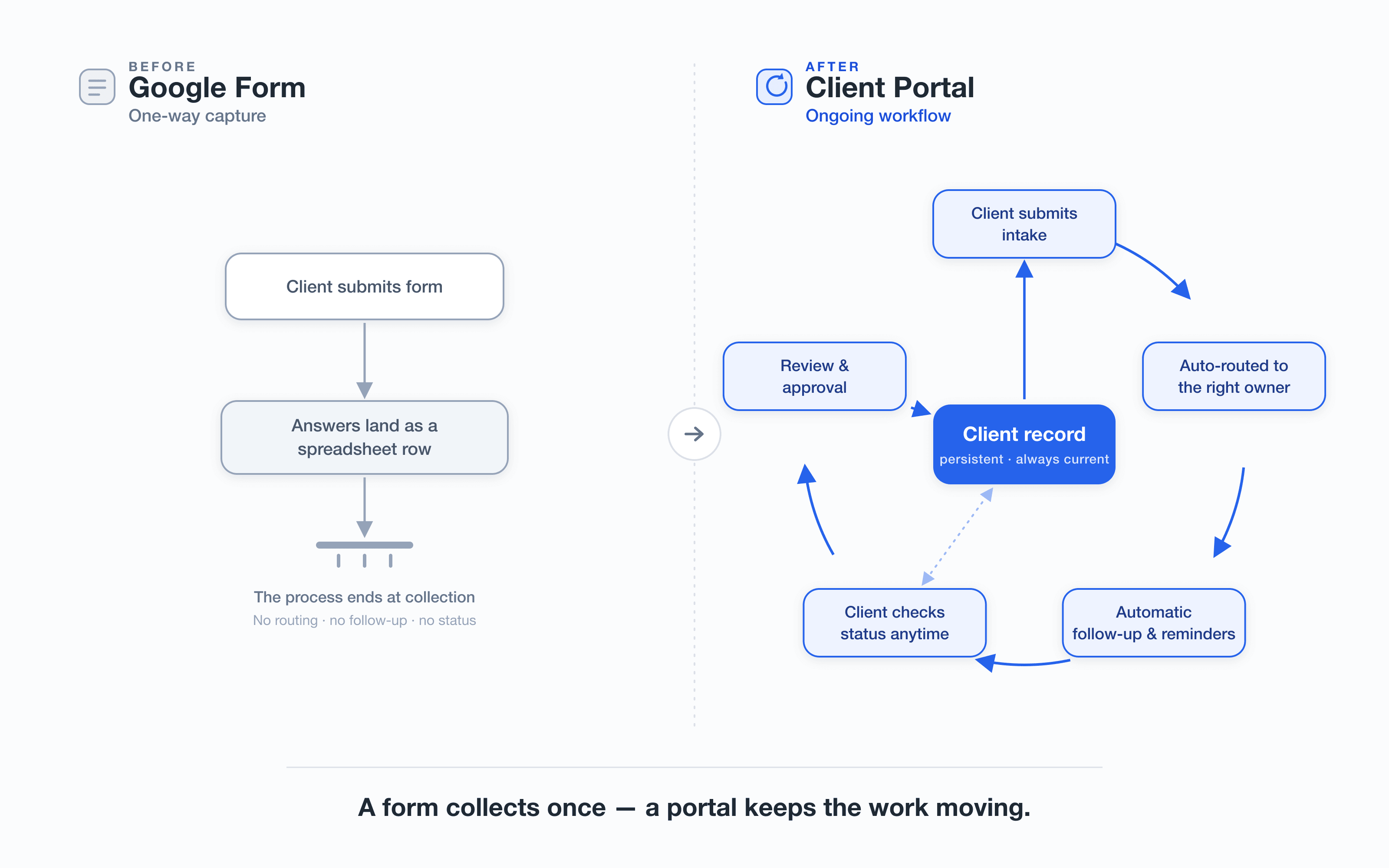
A form collects once — a client portal keeps the work moving.
You've just seen what the right side of that diagram does on paper. But a diagram can only hint at how it actually feels once the pieces start moving. If you're curious, take a short, no-signup tour of a live client portal and watch a single intake turn into a routed, tracked, two-way workflow. No account, no credit card, nothing to commit to — just a two-minute look before you weigh it against the form.
The Honest Comparison: Where Each One Wins
We've walked through a lot of moving parts, so let's put them all on one table. Instead of arguing point by point across a dozen scattered sections, here is the whole decision lined up so you can run your eye down a single column and see where each tool actually earns its place.
Eight criteria decide this, and they're the ones that show up in real day-to-day use: cost, setup speed, data structure, post-submission workflow, client experience, status visibility, files and security, and how each option holds up at scale.
| Criterion | The form | The portal |
|---|---|---|
| Cost | Free or near-free | Ongoing subscription |
| Setup speed | Minutes | Hours to days |
| Data structure | Flat responses | Structured records |
| Post-submission workflow | Manual, off-platform | Built in, automated |
| Client experience | Bare-bones | Branded, guided |
| Status visibility | You chase updates | Everyone sees status |
| Files and security | Basic, loosely controlled | Permissioned, auditable |
| Scale | Fine for a trickle | Built for volume |
Read the form's column and the wins are obvious. Nothing else touches it on cost — free, or close enough not to matter — and nothing else lets you go from idea to a live, collectable link in the time it takes to finish a coffee. When you need to gather a handful of answers without asking anyone's permission or opening a budget line, the form simply has no competition. It is the fastest path from "I need this information" to "the information is arriving."
Now read the portal's column, and the wins are just as clean. Everything that happens after a submission is where it pulls ahead: the work routes itself, statuses update without anyone chasing them, and the whole thing carries your name instead of a generic Google header. It looks like something a serious operation would send, and — crucially — it doesn't buckle when submissions go from ten a month to ten a day. Workflow, professionalism, and scale live in this column.
Here's the observation that matters, and it's easy to miss when you're comparing feature lists: the two tools don't beat each other on the same field. They win on different dimensions. The form wins where the portal is weakest, and the portal wins exactly where the form runs out of road. There is no head-to-head knockout, because they're barely fighting over the same ground.
Which is why "so, which one is better?" turns out to be the wrong question — the kind that feels reasonable but can't actually be answered. Better at what? Better for whom? Strip those away and the question collapses. A tool that's cheaper and faster is not the same as a tool that's better, and a tool built for scale isn't automatically the smarter buy.
The only question that survives is the practical one: which job are you actually doing right now? Collecting a little, occasionally — or running submissions as a repeatable, client-facing process you'll live with for years?
Answer that honestly and the choice more or less makes itself. So let's do exactly that next — turn "which job are you doing" into concrete guidance about who fits the form, who fits the portal, and how to tell which one is you.
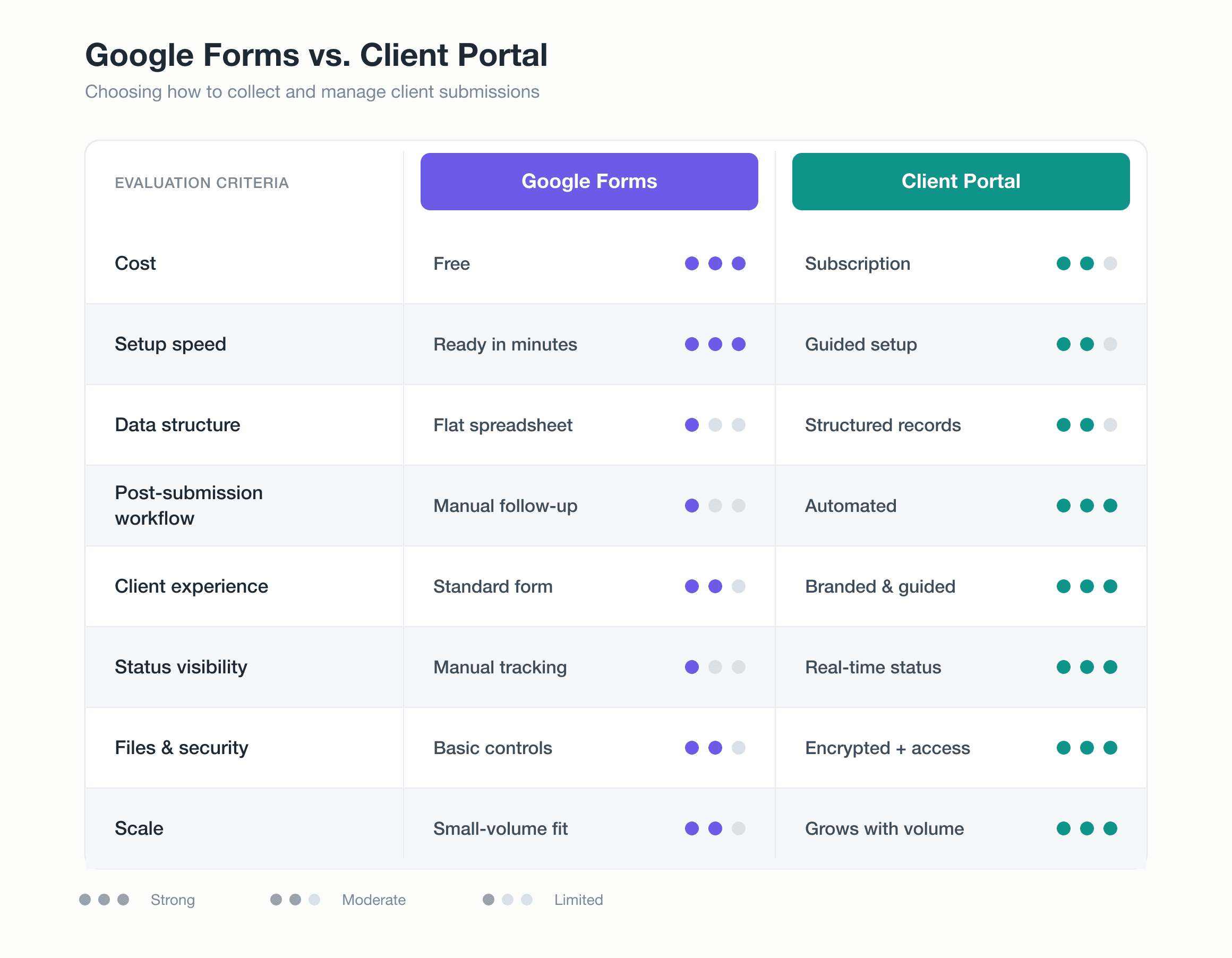
Google Forms vs. a client portal: where each option is strongest for collecting and managing client submissions.
Where You Actually Land
The honest answer isn't a verdict on which tool wins — it's a question about you. There's no universal champion here, no setup that's simply "better" once you strip away who's using it and why. The right call turns entirely on your situation, so the useful move is to stop asking which is superior and start asking which one fits the way you actually work.
Plenty of people are still well served by Google Forms, and there's no reason for them to move. If your volume is low, your intake is one-off or genuinely simple, and you're working solo, a form does the job cleanly. Add little or no budget to spend, plus no real need to show clients a status or chase a follow-up, and you're squarely in the camp the free tool was built for. Staying put isn't settling — it's matching the tool to the load.
Others, though, quietly outgrew the form months ago. This is the world of recurring client work, the kind with back-and-forth, revisions, and approvals threaded through every job. Several projects run at once. A teammate or two is now involved. You need the whole thing to look polished rather than improvised, and some of the files changing hands are sensitive enough that a shared spreadsheet makes you wince. When that's the shape of your week, the form stops keeping up.
Rather than guess which side of that line you're on, run yourself through a short checklist. These are the tells — the signals that the seams are showing.
If you recognize this, it's time:
- You're juggling several active client projects at once and losing track of who owes you what.
- Every engagement involves multiple rounds of revisions and a sign-off step the form can't hold.
- Someone else on your team needs to see or act on submissions, not just you.
- You're copying answers out of the form into somewhere else before you can actually use them.
- Clients ask "where are we with this?" and you have no clean way to show them.
- The files coming in are confidential enough that a plain form feels exposed.
If most of those land, you already have your answer. But watch for one signal in particular. The clearest single tell isn't any one feature you're missing — it's the repetition. If you find yourself doing the same manual patch every single week — the same re-formatting, the same copy-paste, the same reminder chased by hand — that recurring friction is the form quietly telling you it's been outgrown. A one-time workaround is fine. A weekly one is a standing tax.
None of this needs to be agonized over. With these signals in front of you, you can place yourself in one camp or the other without second-guessing it: the form still fits, or the friction says it doesn't. Either way, you're deciding from evidence about your own workflow — not from a guess about which tool is "best."
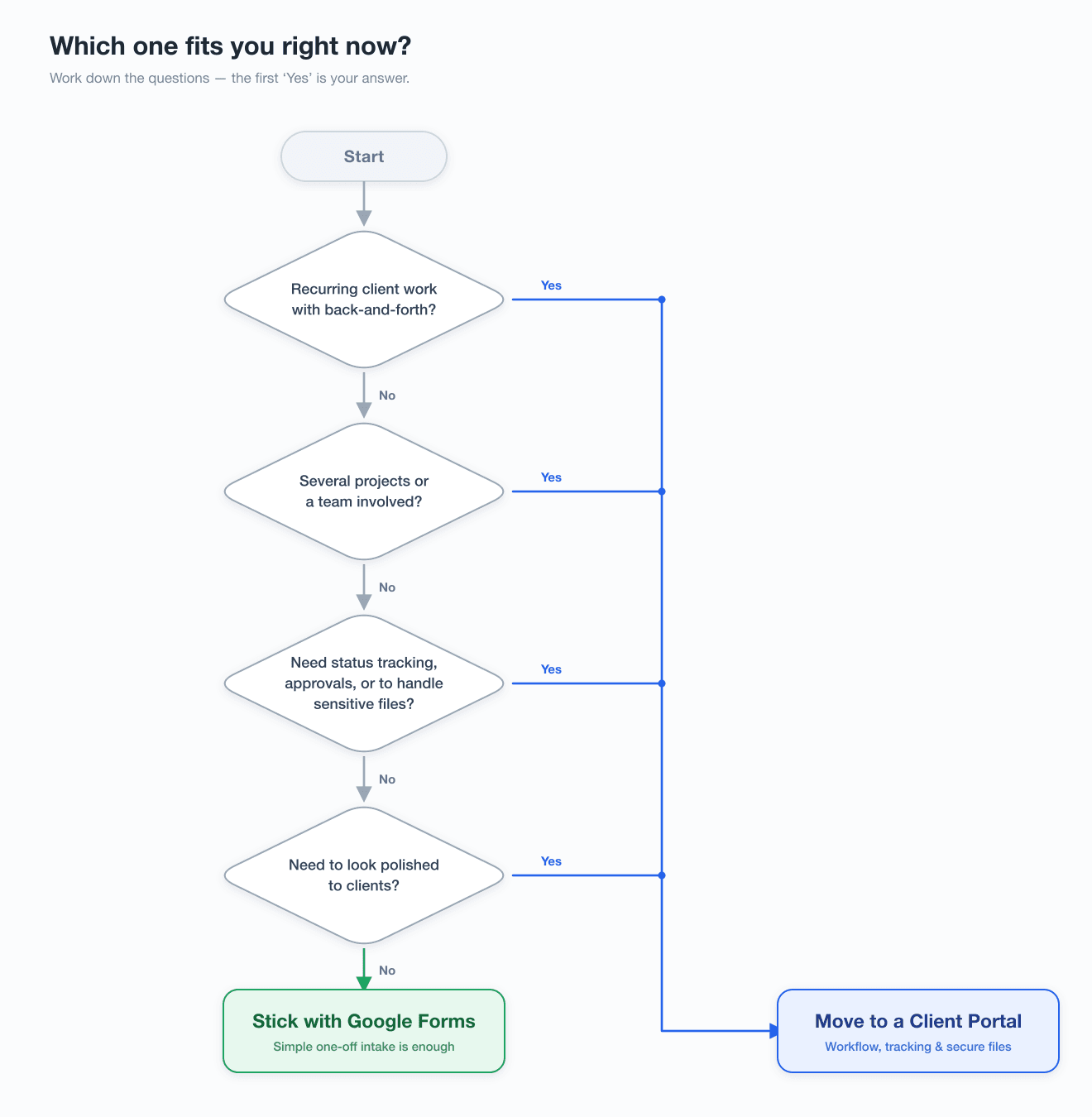
Which one fits you right now? Work down the questions — the first 'Yes' means it's time to move from Google Forms to a client portal.
So here it is — and it turns out the question you've been circling was never really the one worth asking. It was never free versus paid. It was whether the work you're doing now has quietly outgrown a one-way form and started asking for something closer to a workflow: a place where the back-and-forth lives, where nothing falls through, where the client knows what happens next without emailing to ask.
If that's where you've landed, hear this first — Google Forms was the right place to start. It cost you nothing, it went live in an afternoon, and it carried you further than most tools ever get the chance to. Starting there was not a mistake you're now paying for. It was the sensible move, and it did its job.
What's changed is you. The form didn't shrink; your work grew around it. When a tool starts to pinch, that's rarely a sign you chose badly — it's a sign there's more coming through the door than there used to be. Outgrowing the free form is the kind of problem worth having. It's a milestone wearing the costume of an inconvenience.
So weigh it honestly. Go back to the signals we walked through — the copy-pasting, the version confusion, the questions a form can't ask, the follow-ups it can't send — and hold them against your own week. Not against what a form should be able to do, but against what yours is actually costing you in time you don't get back.
And if the friction is finally starting to outweigh the price of free, it might be worth seeing what the other side actually feels like. Take a look at a real client portal — not to buy today, but to know what you're weighing the free form against.
Because you came to this wondering whether paid was worth it, still working out of a free form and not quite ready to move. You're further along than that now. The question has changed, and so, quietly, have you. You already know what to do next.
If your week actually looks like that—the same intake questions, the same "did you get my file?" emails, the same follow-ups slipping through—then this is the step everything above was building toward. You can set up a client portal of your own and bring your intake, files, and follow-ups into a single professional workspace, one your clients can check on their own instead of waiting on you.
Start free, keep only the pieces that genuinely pull their weight, and step away from the one-way form when you're ready—not a moment before.
FAQ
Do my clients need to create an account or log in to use a client portal? Usually yes — a login is what makes the persistent record, saved history, and self-serve status checks possible in the first place. The good news is that the sign-up is typically a one-time, one-click step, and most clients accept it readily once they realize it means they can check status themselves instead of emailing you. If you truly need zero friction for a single, one-off collection, that's exactly the case where a plain form still wins.
How much does a client portal actually cost, and how do I know it's worth it? Unlike a free form, a portal is an ongoing subscription, so the honest way to judge it isn't the sticker price — it's the price against what the manual work is costing you now. Add up the hours each week spent copy-pasting answers, chasing follow-ups, hunting for the right file version, and answering "where are we with this?" emails. If a portal erases most of that recurring tax, the subscription usually pays for itself well before the professional and security benefits even enter the math.
Can I move my existing Google Forms responses and client history into a portal? In most cases, yes. Because form responses already live in tidy spreadsheet rows, they export cleanly, and many portals let you import that data or bring it in through a spreadsheet upload so you're not starting from an empty slate. You generally don't need to migrate everything at once, either — a common approach is to run new intake through the portal while older records stay archived in the sheet, then bring history over only where it's genuinely useful.
Do I have to pick one or the other, or can I keep using both? You can absolutely use both, and plenty of people do. The two tools win on different jobs, so it often makes sense to keep a free form for the one-directional stuff — a quick survey, an RSVP, a public sign-up — while running actual client relationships through the portal. The checklist earlier in this piece is about which tool fits a given job, not a vow to abandon forms entirely.
Is a client portal secure enough for confidential client documents? This is one of the clearer places a portal pulls ahead of a form. Files move through a controlled channel with real access permissions and a record of who can see what, rather than living as email attachments forwarded around until nobody's sure who still holds a copy. If you routinely handle sensitive material — contracts, financials, personal data — that permissioned, auditable handling is exactly the gap that makes a shared spreadsheet feel exposed.