If you own or run a small client-service business (a clinic, a studio, an agency, a law or accounting firm, a tutoring practice, a contracting business), your week runs on documents: intake forms, service agreements, session notes, price lists. Nearly every client relationship passes through them, from the first enquiry to the work itself, so they set the pace of the whole business. Yet most of the talk about AI and documents is about what happens after those documents already exist: summarizing them, or chatting about them. The costly part of document work comes earlier, before there is anything to summarize. It breaks down into three jobs: creating each document in the first place, tailoring it to the specific client in front of you, and keeping it up to date as your services, prices and policies change. We'll start with a concrete look at each of those problems. Then we'll show what they cost you: in time, in client forms that never get completed, and in accuracy. Finally, we'll show what changes when AI works inside the document instead of beside it.
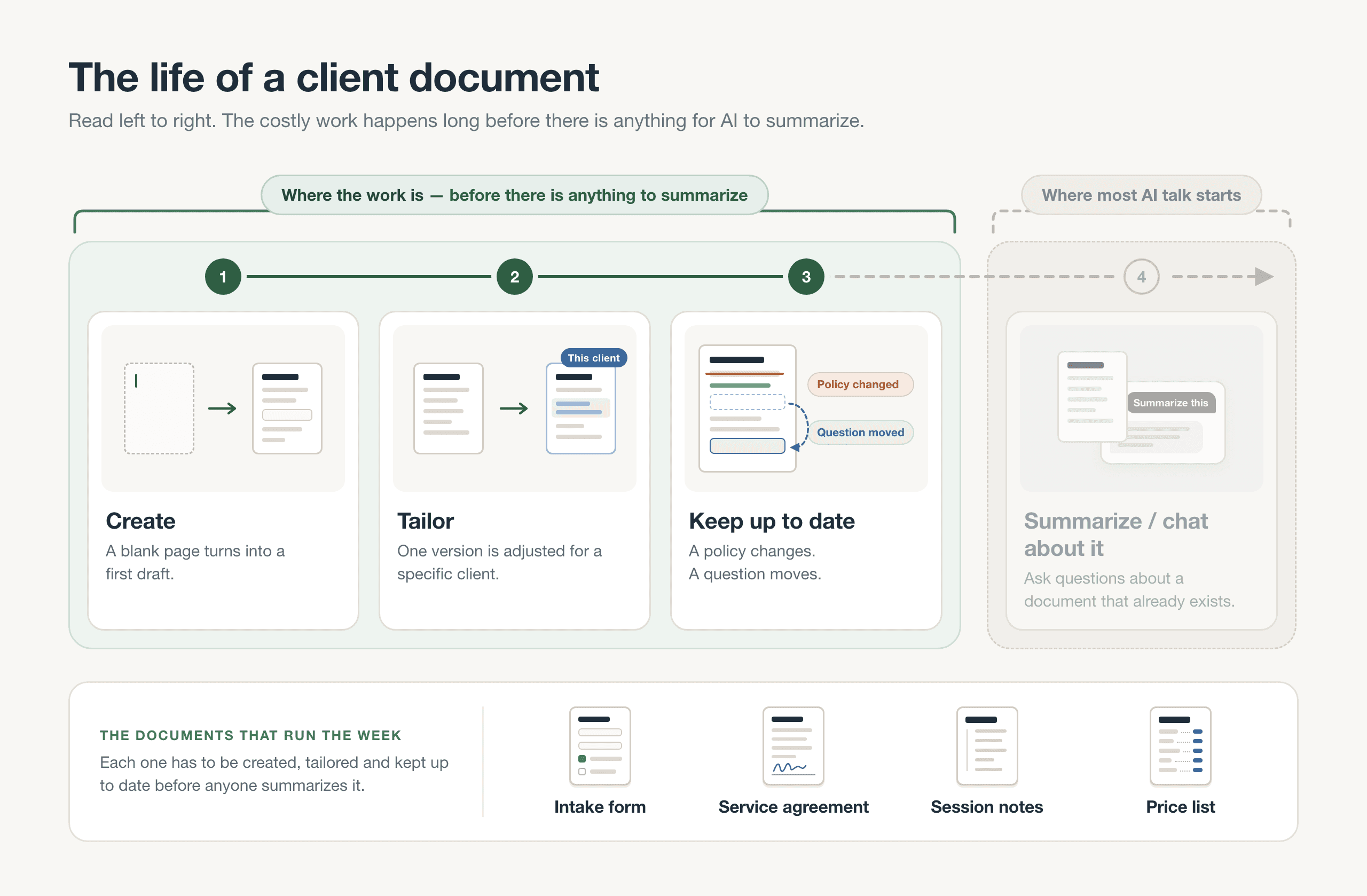
Creating, tailoring and keeping a document up to date all happen before there is anything to summarize. That is where the costly work is.
Problem 1: Every New Document Starts From a Blank Page
Every new service, client type or policy brings with it a new form or agreement. In a small business, the owner usually writes that document alone. There is no admin team to hand it to and no designer to make it look right. So it starts in one of two places: a blank page, or an old Word file copied and stripped down until it can be reused.
The occasions are ordinary and frequent. A clinic or studio adds a new treatment, and that treatment needs its own intake questions. A new service package needs its own agreement, spelling out what is included and what isn't. A price list has to be rebuilt every time offerings or packages change.
Behind each of these sits three pieces of work that are easy to underestimate. The first is deciding which sections the document needs and in what order they should appear. The second is writing each question and choosing the right field type for it: a date, a checkbox, a choice list or a signature. The third is making the new document look and read like the existing ones, so the whole set feels consistent to clients.
None of this is typing. The bottleneck is structure. Once the skeleton exists, the wording comes quickly. That structural design work starts over with every new document, and it is the part any real help would need to take over.
Problem 2: Each Client Needs a Slightly Different Version
Even if Problem 1 is solved and you already have a solid template, a standard template rarely fits every client. One client needs extra questions your standard intake form never asks. Another wants a scope of work that stretches beyond what your standard agreement covers, so the deliverables, timeline and fees all need rewording. A third proposes an arrangement so unusual, say a split payment schedule, that no template anticipated it, and you end up drafting a one-off agreement.
In practice, tailoring rarely starts from a blank page. It starts by duplicating an existing document, usually the one made for the previous client, since it is the closest match. Then you edit the copy by hand, section by section, adding a question here, rewriting a scope line there, adjusting terms until it fits the new client. Behind every duplicated file sits a quiet hope: that nothing from the last client has been left behind, no stray name in a heading, no old date in a deadline, no scope line that belongs to someone else's project.
These variations come up week after week, yet you rarely have the time to make each one carefully. Per-client variations bring back exactly the manual work the template was supposed to remove.
Problem 3: Small Edits Turn Into Rewrites
A document is never really finished. Once it's in use, it keeps changing. Your cancellation policy gets updated, say from 24 hours' notice to 48. A new section has to be added for a service you now offer. A block of terms needs rewording after a client misreads it. A question on the intake form needs to move higher up, because people keep skipping it.
Each of these changes begins with finding the right spot in the document. Then the text around it has to be rewritten so the document still reads as one piece, not as a patch stitched on. And all the while, the formatting and fields have to survive intact. A question you move should still be a date field or a checkbox when it lands, and the layout around it shouldn't break.
The harder part is that one policy change rarely lives in one place. The new cancellation terms belong in the intake form, the client agreement and the price list, all at once. Making the same edit three times is tedious, and it's easy to get one wrong or leave one half done, so clients end up reading two different rules.
Creating documents is only half the time cost. Maintaining them keeps coming back, and a one-line change routinely becomes a rewrite.
Problem 4: Copy-Pasting From a Chatbot Breaks the Document
If you've hit the problems above, you've probably already tried a general chatbot to get past them. The routine is familiar: describe the form you need in a chat, copy the answer, and paste it into a doc or a form tool. The text does show up quickly. But several things break between the chat window and the finished document.
- The structure doesn't survive the paste. Fields arrive as plain text, so checkboxes, choice lists and signature lines are just words on a page. Every one of them has to be rebuilt by hand, which brings back the structural work from Problem 1.
- The chatbot has never seen your other documents. It doesn't know how your intake form is worded or how your agreements are laid out, so the new document's tone, wording and layout don't match the rest of what your clients receive.
- It fills the gaps with things you never decided. Where it lacks a detail, it makes up one that sounds right: a cancellation fee, a refund policy, payment terms you never set. Each one has to be caught and corrected before a client reads it.
- The finished text sits nowhere near the client's file. You still have to place it, attach it to the right client and send it.
AI that works outside the document still leaves you doing the assembly. So the real question isn't whether AI can write the words. It clearly can. The question is whether it can work where the document actually lives. Before answering that, it helps to see what these four problems cost.
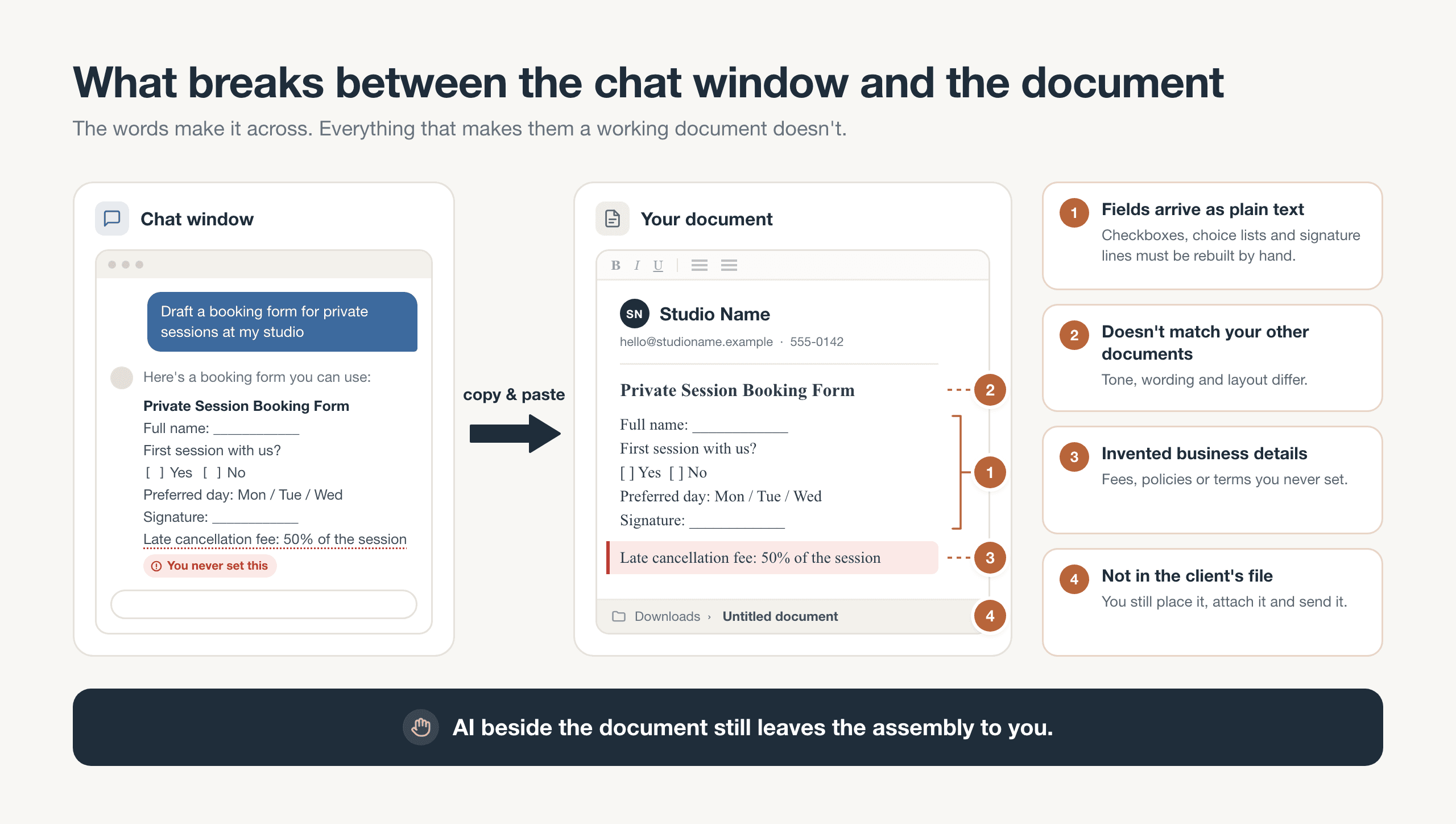
Pasting a chatbot's draft moves the words, but you still rebuild the fields, match your style, remove invented terms and file it yourself.
Impact on Your Time: Paperwork Takes the Hours You Should Be Billing
Those slip-ups are only half the story. The other half is what all this paperwork costs, and the first bill lands on the owner's own calendar. In a business of one to five people, the person running it is usually also the only admin. Document work never gets its own slot in the week, so it gets done in the evenings or in the gaps between appointments.
Three things follow from that. A new service launches late because its intake form and agreement still aren't ready. Proper templates keep getting pushed to "next month," so clients get an emailed attachment to fill in, scan and send back instead. And every client who needs a slightly different version, along with every policy edit that has to be copied into each file, adds more manual work to a backlog that was already there.
Those hours have to come from somewhere. They come straight out of billable work, or out of the rest the owner was counting on. That's why the cost is easy to miss. It's rarely one big loss. Instead it's a steady drain of small tasks like re-sending, re-typing, chasing and re-attaching, and none of them ever shows up on an invoice. The cost doesn't stay with the owner either, because clients feel these documents too.
Impact on Your Clients: Every Bit of Friction Costs a Completed Form
Now look at the same documents from the client's side. The owner sees a form every day, but a client opens it only a handful of times. They usually open it on a phone, with no account and no training in how the form works. So they have little patience for working out a document that wasn't clearly made for them. Picture a generic intake form full of questions that don't apply to the service they booked, such as a medical history section for a one-off consultation or business details for a private customer. Or picture a layout that's hard to follow on a small screen, or a document so plainly written for a different kind of client that they wonder whether they were sent the wrong link.
What clients do next is predictable: they stall and leave it for later, give up halfway through, or reply with questions instead of answers. Every bit of friction on the client's side costs the business a completed submission. In practice, the owner goes into a first appointment with information missing. It also takes more back-and-forth messages to collect what the form should have captured, and each one pulls the owner back into admin. The owner's document problems don't stay behind the scenes. They show up directly in how the client experiences the business.
Impact on Accuracy and Trust: One Copied Mistake Ends Up in Every File
The third cost is accuracy, and it builds up quietly. Copied documents spread errors, because whatever is wrong in one copy gets carried into the next. You duplicate last month's agreement for a new client and miss the previous client's name still sitting in one clause. You update your cancellation policy everywhere except the one intake form you still send from an old file, so outdated terms keep circulating. Or you paste in a chatbot draft, and an invented detail, such as a deadline you never set or a fee you don't charge, slips past a tired read and reaches a client.
Each slip looks small on its own. But to the client who receives it, inconsistent paperwork makes a small business look disorganized. And when two versions disagree, nobody can say for certain which terms actually apply. Sometimes even you can't say.
The problems compound. Documents written by hand under time pressure, then patched together from copies of copies, stop being just an admin chore and turn into a credibility risk. More late-night proofreading won't fix that. What fixes it is a different way of producing documents and changing them, so each new one starts from a single current version instead of whatever you sent last.
What Changes When AI Works Inside the Document
Pocper is a client-management workspace with Pocper AI, an assistant that lives in the same app as the business's templates, clients and documents. Each capability that follows answers one of the four problems described earlier. They also share one contrast with Problem 4: Pocper AI works inside the document rather than beside it, so its output lands where the owner will use it, not in a reply to copy across and tidy up.
Start with the blank page from Problem 1. Instead of building from nothing, the owner describes the template they need using Generate with AI, found in the templates page's header or under any folder's templates. That one description becomes a whole template, with a title, sections and fields, so the structural work is done before anything is typed into it. It is saved as an unpublished draft and opened in the editor, and it gets no share link until the owner publishes it. It can be any of the four kinds Pocper works with: a form, a shared data document, an agreement or a publication.
The new template is written to match the other templates already in that folder, so it fits the existing set instead of reading like a generic sample. It reuses the business's own details only where those templates already state them. For everything else the business would have to supply, such as a price or an address, it leaves [placeholders] instead of inventing them. That answers the invented-details issue from Problem 4: the gaps are marked for the owner to fill in, not filled with guesses that read like facts.
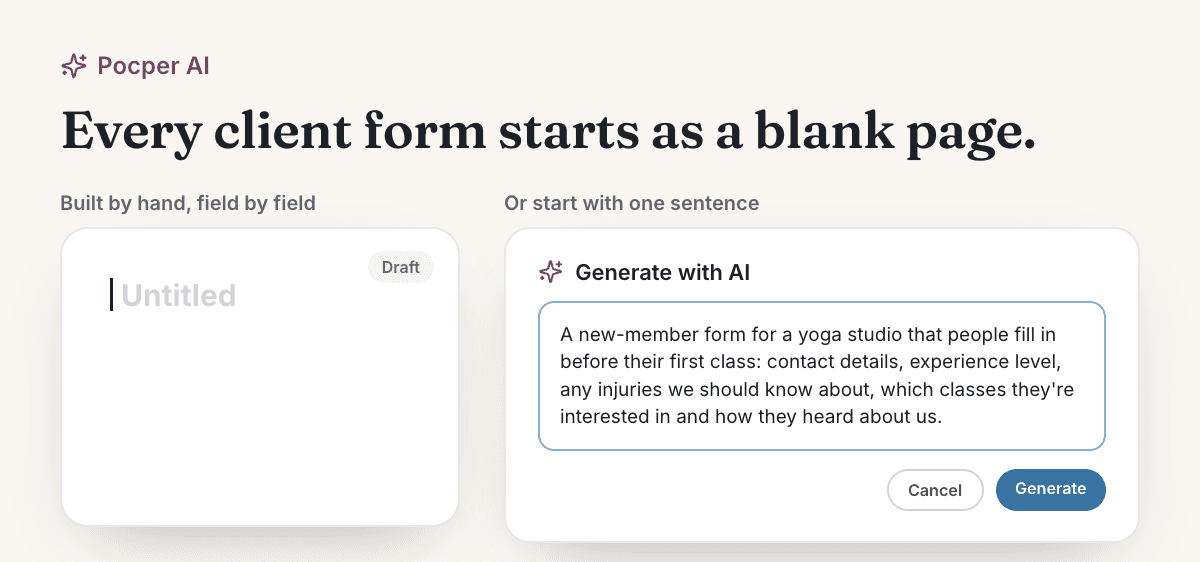
Two ways to start the same form: an empty page you build field by field, or one sentence. The sentence here is the real description a yoga studio's new-member form was drafted from.
Have a form you've been meaning to make? Describe it in a sentence and let Pocper AI draft it: sections, working fields, and [placeholders] for anything it doesn't know yet. It's saved as an unpublished draft, so nothing reaches a client until you choose to publish it, and you have nothing to lose by seeing what it gives you. Pick one form you already need and try Generate with AI free.
One Client's Paper, Drafted in That Client's File
That leaves the second problem: the client who needs a version of a document no one else gets. Start it from their file. A client's New paper dialog has a Generate with AI tab. Describe what this client needs, and Pocper AI drafts a new paper directly in that client's file, with no answers filled in. It lands in whichever zone you pick.
The draft is written to match the templates linked into that client's file, so the one-off version still fits the documents they already have. Nothing else about the client is sent: not their other papers, not their answers and not their name.
The zone you pick decides who sees it. A paper made in the Shared zone shows up in the client's portal like any other shared paper; one made in the Internal zone stays with your team.
Compare that with duplicating the last client's document and hoping nothing was left behind: a stray name in a heading, an old date, someone else's answer still sitting in a field. Here the variation starts fresh, in the right file, with nothing carried over from anyone else.
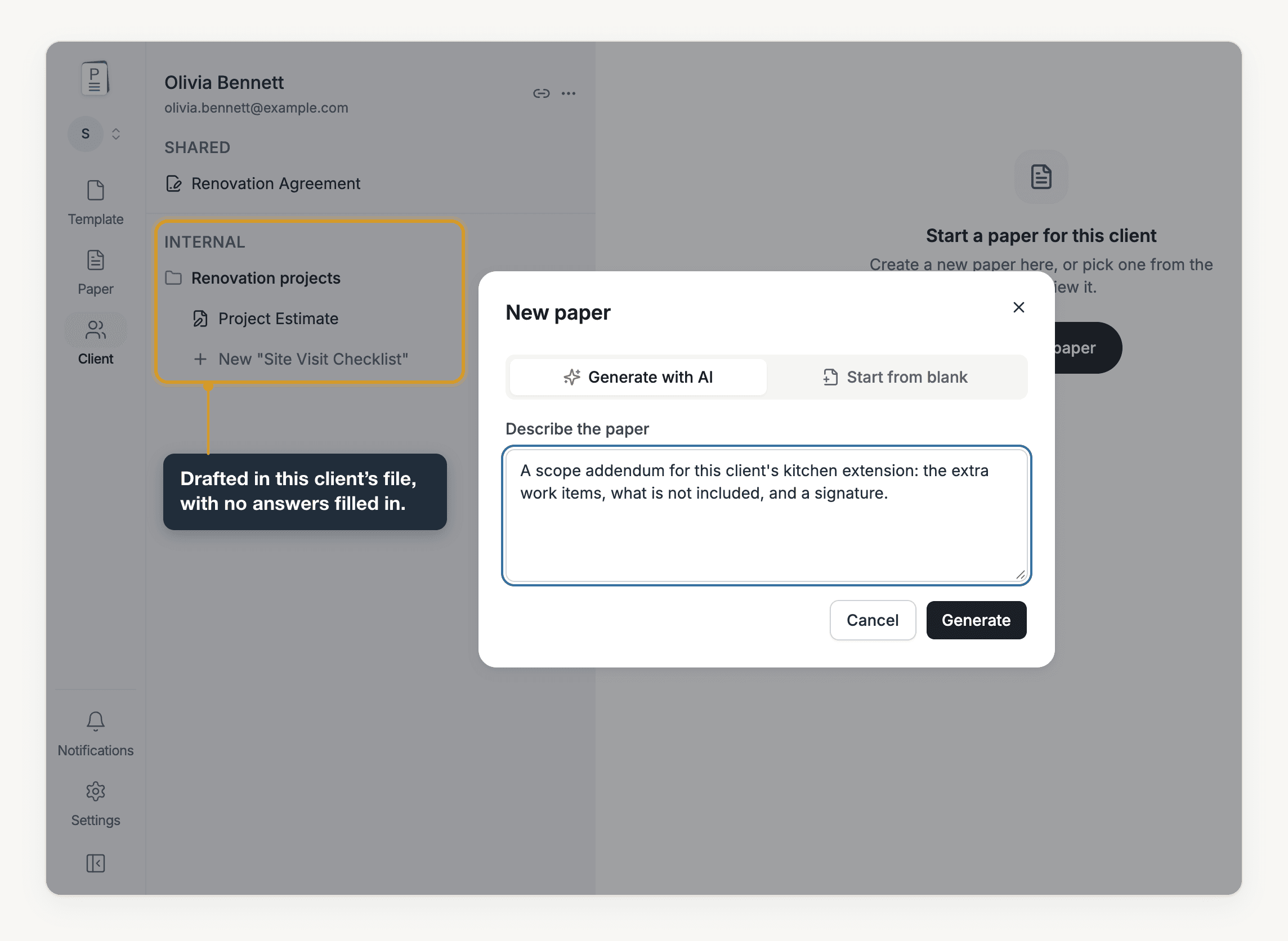
Drafted in this client's file, with no answers filled in.
Edits Happen Inside the Document
That leaves Problem 3: the edits that keep coming once a form is in use. Open the template or paper and ask Pocper AI for the change in chat, such as rewording the cancellation clause to require 48 hours' notice or moving the emergency-contact question into the first section, and it proposes the change in the document itself. The fields and layout survive, and there is nothing to copy across. That also answers Problem 4: what you end up with is a real template or paper with working fields, already in the right place.
You stay in charge of every draft. Anything your business still has to supply appears as a [placeholder], so your review is targeted: you can see exactly which details to fill in instead of rereading every line to hunt for gaps. A generated agreement is a draft — review it before you use it.
Start With the Document You Keep Putting Off
Blank pages, a new variation for every client, edits that never end, and copy-pasting between a chatbot and the document: those are the four problems. They cost you time, they cost the business forms that never get completed, and they cost accuracy whenever details are copied by hand. With Pocper AI working inside the document itself, each of those jobs becomes a draft to review rather than a page to write from scratch.
So pick the one form or agreement you have been putting off. Describe it in a sentence or two, then read the draft that comes back and change whatever needs your judgment. When it reads right, publish it and send your client one link.
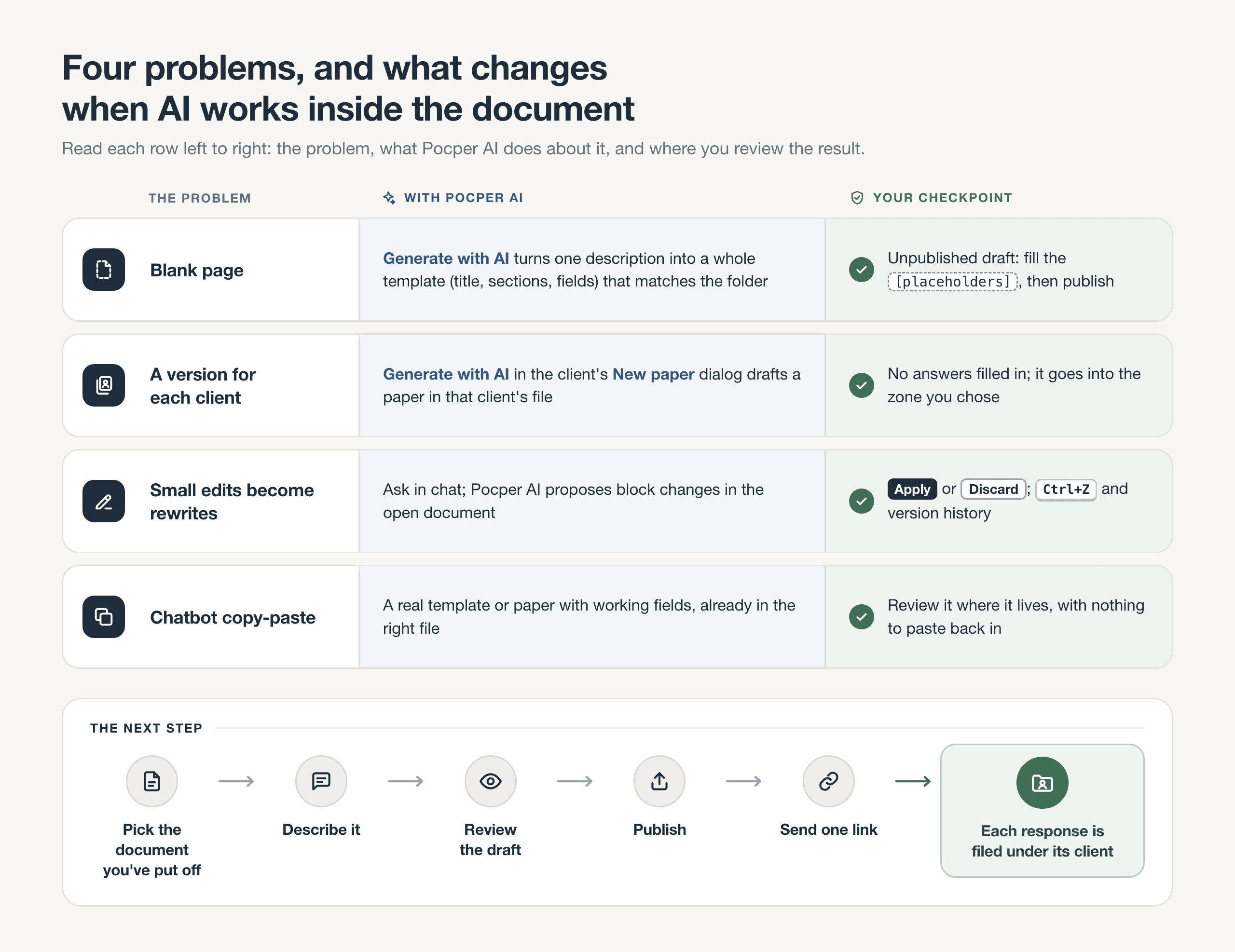
Each problem, what Pocper AI does about it inside the document, and where you review the result, followed by the five steps to get started.
Ready to clear the document you've been putting off? Create your free Pocper account, describe the form or agreement you need, and review the draft. When it looks right, publish it and send your client one link. Start free with Pocper and put that document to work with a real client.
Frequently Asked Questions
If I update a template, do the papers I've already sent change too?
No. A paper keeps the content it was created with, so a client who has already filled in or signed your form keeps the version they saw. Changes to a published template stay unpublished until you publish again. After that, new papers start from the updated version, and the share link you already sent stays the same. If an existing client's paper needs the new wording, open that paper and ask Pocper AI to change it there.
Can I start from the Word documents I already have?
Yes. Import turns Word (.docx), PDF, Markdown and plain-text files into templates, along with links to public Google Forms and Google Docs. Lines of underscores become fill-in fields, and ☐ or [ ] boxes become checkboxes. Once your documents are in, you can ask Pocper AI to edit them. New templates you generate in the same folder are written to match them.
Do my clients need an account to fill in a form?
No. Your client opens the link in their browser, on their phone or computer, and fills the form in there. There is no app to install and no account to create, and their response is filed under a client in your workspace.