Introduction: The Hidden Cost of Managing Clients in a Tiny Team
It's 4:52 on a Thursday, and you're wrapping a session with one client while another texts to reschedule, a third emails asking where their intake form went, and you're mentally holding all three at once. If that scene feels familiar, you already know the quiet problem this article is about.
At this size, client information doesn't live anywhere in particular. Some of it is in your inbox. Some is in a notes app on your phone. A little sits in a spreadsheet you started with good intentions. And a surprising amount lives only in your head. Spread across four places that don't talk to each other, the full picture of any single client is never in one spot.
That fragmentation causes one failure over and over: follow-ups slip quietly through the cracks. Nothing dramatic — nobody notices in the moment. A reply you promised by end of day never gets sent. A warm enquiry you meant to circle back to goes cold while you're heads-down on delivery, because the reminder only ever lived in your memory.
This article is for exactly that person: a solo operator, or a two-to-five-person service business, running the whole thing with almost no overhead. Unlike a larger company, you don't have an operations person or an admin quietly absorbing the mess in the background. You're doing sales, delivery, and admin in the same afternoon — so when something slips, there's no one else to catch it.
And at this scale, that matters more, not less. Every hour lost to hunting for a file, and every relationship that quietly drops, is directly material to revenue. Thin margins and a short client roster mean each one carries real weight; there's no volume to hide a mistake inside. One dropped ball isn't a rounding error here — it's a noticeable piece of the month. Being small doesn't shrink the cost of disorganization; it amplifies it.
Here's the hopeful part: this is a burden the right tool can absorb, instead of leaving it balanced on the owner's memory. So this article walks a straight path. We'll define what actually matters for a team this size, look at the realistic options on the table, compare them honestly, and land on a single recommendation.
Before any of that, though, one question comes first — because "best" means something very specific for a tiny team, and it's worth pinning down before we start shopping.
What "Best" Actually Means Here
"Best" isn't a trophy handed to whichever tool tops a feature checklist. For a business of one to five people, best means fit — how well a tool matches the way a tiny team actually works, spends, and finds time. A product can be objectively powerful and still be the wrong answer for you, because power you can't use is just weight you end up carrying.
Enterprise CRMs are the clearest example. Salesforce, Microsoft Dynamics, and their peers are genuinely capable systems, but at this size they aren't merely overkill — they're actively mis-fitted. They're built on assumptions a five-person shop simply doesn't meet: a dedicated admin to configure and maintain them, a budget that comfortably absorbs per-seat licenses and outside consultants, and a layered sales organization with pipelines, stages, and territories to manage. Strip those assumptions away and most of the machinery just sits there — unused, quietly costing money and attention you can't spare.
So rather than chasing raw capability, this article scores tools against six concrete criteria. Think of them as the yardstick the rest of the piece measures everything by.
1. Fast setup and a gentle learning curve. You don't have a spare week, and you don't have a spare person to run an implementation project. If a tool can't earn its place within a day or two, it has already failed the first test.
2. Affordable, predictable pricing at 1–5 seats. Cash flow at this size is tight and lumpy. Per-seat cost has to stay small and — just as important — foreseeable, with no surprise jump the month you add your third or fourth person. A price you can't forecast is a risk, not a plan.
3. Core client management, without the bloat. By "core" we mean the essentials: your contacts, a running history of what's happened with each one, and a clear read on where they stand right now. Every module beyond that — the ones a big team lives inside — turns into friction here rather than value, one more screen to ignore.
4. Built-in communication and follow-up. Following up should be a job the software owns and prompts you through, not one more thing the owner has to carry in their head between appointments. When memory is the system, things fall through the cracks.
5. Light automation and the right integrations. It should connect to the calendar, email, and invoicing tools you already run each day. Plugging neatly into your existing stack beats being asked to tear it out and replace everything at once.
6. Mobile access and no-admin usability. Owners work from a car, a client's site, a phone between jobs. There's no IT person waiting to set permissions or maintain a server, so the tool has to configure and look after itself.
It's worth being just as clear about what's deliberately left off the list. Advanced forecasting, full marketing automation, deep customization and scripting — all excluded on purpose. Not because they're bad features, but because at this scale they pile on cost and complexity while the payoff never really arrives. You'd be paying for capacity you have no realistic path to growing into.
These six criteria are the entire scoring rubric — no hidden seventh, no asterisks. Every tool in the comparison ahead, and the single winner we land on at the end, gets measured against exactly this, and nothing more.
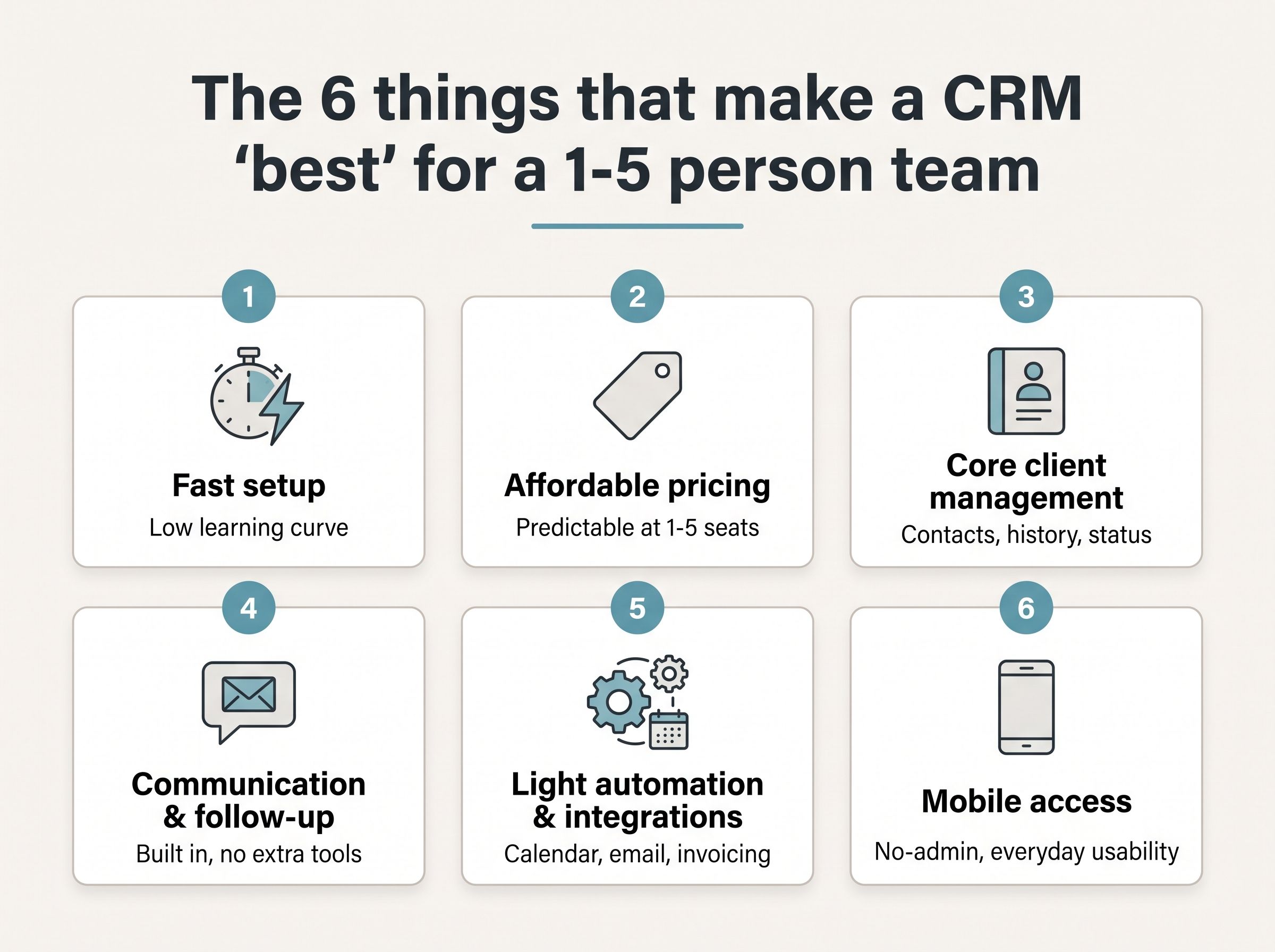
The six-point yardstick this article scores every CRM against - fast setup, affordable pricing, core client management, built-in communication, light automation, and mobile access.
Want to keep this yardstick in front of you as you weigh the options below? Grab the free one-page CRM scorecard — the same six criteria laid out as a checklist you can rate any tool against in about five minutes. No signup, no email required.
The Realistic Options on the Table
With the criteria settled, the more useful question is what actually sits in front of a small team once they start looking. Rather than name specific brands — which change, get acquired, and reprice without warning — it helps to think in categories, because the real trade-offs live at the category level. Four of them cover almost everything a small client-service business would realistically weigh up.
The first is the all-in-one small-business CRM. These are built to be the single place a small operation runs its client side from, bundling contact records, scheduling, messaging, and often invoicing into one system. They suit owners who want one login and one bill, and their strength is exactly that consolidation: client management and communication sit together, so nothing has to be stitched across separate apps.
The second is the lightweight, general-purpose CRM. Pared back by design, these focus on tracking people and interactions without the weight of a full business suite. They suit a team that wants to get organized this week, not next quarter, and their strength is simplicity — little to configure, little to learn, and quick to adopt for anyone who has resisted "software" until now.
The third is the project-and-client hybrid, or workspace tool. These blend task and project management with a place to hold client information, so the work and the relationship live in the same view. They suit teams whose value is in delivery — designers, agencies, consultants — and their strength is handling the doing and the client relationship at once, rather than treating them as two separate problems.
The fourth is the baseline almost everyone starts from: the spreadsheet, or a free do-it-yourself stack. A shared sheet, a folder of documents, maybe a free form tool bolted on. It suits the team not yet ready to commit budget or learning time, and its strengths are genuine — it is free, endlessly flexible, and already familiar to every person who will touch it.
These sketches are deliberately flat. The point here is not to crown a winner or bury a loser, but to lay the field out honestly; the judgment comes later, when each option is held against the same yardstick rather than described in isolation.
That is the shift worth making next. Knowing what to look for is only half the exercise — the other half is watching how these four categories actually perform when the six criteria are applied to each in turn. That is where the neutral descriptions above begin to separate.
Head-to-Head: How the Options Compare
The table below lays the four categories out as rows and scores each against the six criteria that matter most when you're tracking clients as a team of one to five. Read it left to right for a single option's full profile, or scan a single column top to bottom to see which category owns a given strength.
Each cell uses a four-point scale. Excellent means the category does this well with no real caveats. Good means it does the job capably, with only minor gaps. Fair means it works, but you'll feel the friction. Poor means you'll spend your time fighting the tool or filling the gap by hand. Every mark is relative to what a small team actually needs day to day — not to a long enterprise feature list.
| Category | Ease of adoption | Client history | Follow-up & reminders | Communication | Integrations | Cost |
|---|---|---|---|---|---|---|
| All-in-one CRMs | Fair | Excellent | Excellent | Excellent | Excellent | Fair |
| Lightweight CRMs | Excellent | Good | Fair | Good | Good | Good |
| Hybrids & workspace tools | Fair | Excellent | Good | Fair | Good | Good |
| Spreadsheets | Good | Poor | Poor | Poor | Fair | Excellent |
Read straight through, the grid can blur into a wall of ratings, so here is what it's really telling you: no category wins outright. Each one wins or loses on the specific criteria you lean on hardest.
All-in-one CRMs lead on communication and follow-up. Email, reminders, and next-step nudges live inside the same record as the client, so nothing slips because it was in another app. That end-to-end coverage is their whole pitch, and the ratings bear it out. Their one real cost is exactly that: they run a little more expensive than the alternatives, and you pay whether or not you use every corner of them.
Lightweight CRMs win on simplicity and speed of adoption. A one-to-five-person team can be up and running the same afternoon, with no setup project and no training. The trade-off is follow-up: they'll store a contact happily, but they're thin on the reminders and structured next steps that keep a slow-moving client from going cold.
Hybrids and workspace tools win when the work is project-heavy — when each client is really a project with tasks, documents, and deadlines attached. They keep a rich record and bend to your process. But for pure client tracking, that flexibility turns into weight: you're building the system before you can use it, which is why they score only Fair on getting started.
Spreadsheets win on exactly one thing: cost. They're free and familiar, and for a first handful of clients that's genuinely enough. Beyond that they fail on the things that compound — no real history you can trust, no reminders at all, and no graceful way to scale as the client list grows.
Watch the integrations column, too. When two options otherwise score closely, integrations quietly break the tie: the one that already talks to the tools you use wins the day-to-day, even if the feature lists look identical.
If you're looking for the single column that points toward the winner, it's follow-up. Client history and cost tell you where each category sits, but follow-up is where the real contenders separate — it's the criterion most likely to decide which one you should actually pick.
That's exactly the judgment the next section makes: turning these scores into one clear recommendation for a team of your size.
The Winner: Our Recommendation for Small Service Teams
For the typical small service team, the all-in-one small-business CRM is the single best choice. That verdict isn't about which name comes up most often or which tool has the loudest launch; it falls out of the criteria, applied one by one, to each option in turn. The decisive fact is simple: it is the only category that scores well on all six criteria at once, instead of buying a strength on one by conceding a gap on another. Every other option wins on two or three and gives ground on the rest.
Its defining advantage is that it treats the connective work — filing every form, note, and signed agreement under the right client the moment it arrives — as a first-class job the software performs, not a chore left to you. In the other options, that same work is manual: whether this week's intake ends up beside last month's notes comes down to someone remembering to move it between tools. For a two- or three-person team, that difference is not cosmetic. Relationships, repeat work, and the revenue behind them all hinge on staying on top of each client — and that cannot safely live in a busy owner's memory.
We won't pretend the choice is free of trade-offs. It is not the cheapest option on the table; a spreadsheet you already own costs nothing to start. At this size you will leave some of its capabilities untouched, at least in the first year. And if your work is organized project-first — delivery milestones, tasks, and deadlines rather than an ongoing client relationship — it is a weaker fit than a tool built around projects.
Those concessions are real, and they are also acceptable. None of them touches the one thing a small service team cannot afford to get wrong, and that is exactly where this option delivers what the others can't. You are paying a little more, and carrying a few features you don't yet need, in exchange for the criterion that actually decides whether the business keeps its clients.
So the recommendation is not a hunch, a favorite, or the loudest brand in the room. It is where the criteria and the head-to-head comparison lead when you follow them honestly, without shortcuts: the option that stops client follow-up from being a memory test and keeps what each client needs next in plain sight is the one a small service team should reach for first.
That said, "first choice for the typical team" is not the same as "right for everyone." A few specific situations genuinely call for a different pick — and those are worth naming plainly before you decide.
When a Different Pick Makes More Sense
No single tool wins for everyone, and it would be dishonest to pretend otherwise. Three specific situations point somewhere other than our top choice — and naming them up front is part of making the recommendation with confidence.
The first is a team whose work is heavily project-based, where every client engagement is really a multi-stage deliverable with tasks, dependencies, and deadlines. For them, a hybrid workspace tool that blends project management with light client records tends to fit better. Weighed against our criteria, this is a case where project management carries more weight than pure client tracking; when the day is organized around moving projects forward rather than keeping client paperwork in order, the tool should be organized the same way.
The second is the zero-budget solo freelancer just starting out. A humble spreadsheet is a perfectly reasonable place to begin, and there's no shame in it. Mapped back to the criteria, this is the scenario where cost and predictability outrank every other factor: with no budget to commit yet, a free spreadsheet you already know wins on the two things that matter most right now — it costs nothing, and it behaves exactly as you expect.
The third is a team with concrete, aggressive-growth plans already on the calendar. If you know you'll be scaling headcount and pipeline within months, it can make sense to adopt a more scalable, sales-oriented CRM sooner rather than migrate twice. Against the criteria, an imminent scaling need outweighs the appeal of simplicity today — you're optimizing for where you'll be, not only where you are.
These are genuine exceptions, though, and worth keeping in proportion: they describe real minorities, not the typical case. Most small client-service teams still land squarely on the main recommendation. Far from diluting that pick, these edge cases sharpen it — they mark the precise boundaries where it applies, and a recommendation that knows its own limits is a stronger, more trustworthy one than a claim that insists it fits everybody.
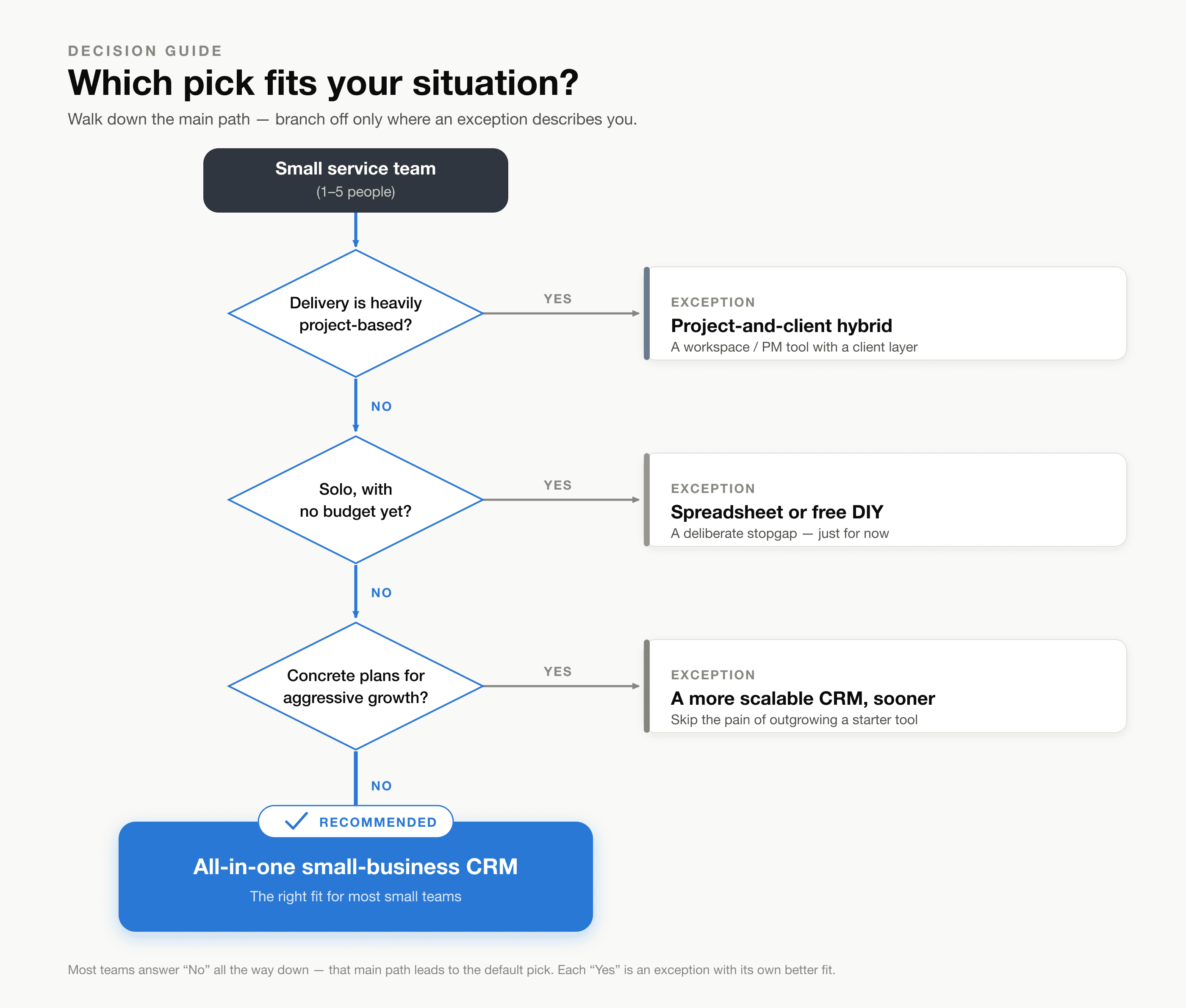
Which pick fits your situation? Walk down the main path — most teams answer "No" all the way to the recommended all-in-one small-business CRM, while each "Yes" is an exception with its own better fit.
Getting Started Without Overthinking It
You've weighed the options long enough. The point of your first week isn't a flawless setup — it's momentum. Get moving, and you can refine everything else once the tool is actually part of how you work. Perfection can wait; a start cannot.
Here's a simple three-step plan to carry you through that first week:
-
Commit and stop deliberating. Pick Pocper, open a free account, and close the other tabs. The comparison spreadsheet has done its job; more research just delays the one thing that actually helps, which is using it.
-
Bring your current clients in. Give each client you already work with their own folder. You don't need every detail on day one — a name and a folder is enough to start filing real work against, and you can flesh the rest out as you go.
-
Set up one simple form, then one follow-up routine. Import an intake form you already use (Pocper takes a .docx, a PDF, or a Google Forms link) or start from a ready-made template — one form, not a whole library. Then decide how you'll keep track of replies: a quick weekly glance at who's submitted and who hasn't is plenty, because every response files itself under the right client the moment it lands. Nothing sits in an inbox waiting to be sorted by hand.
Resist the urge to configure everything at once. You don't need custom folders for every scenario, a template for every occasion, or a tidy system you'll admire more than you'll use. One form and a handful of clients is a real start; an elaborate blueprint you never finish is not.
And if you set something up and later wish you'd done it differently, that's fine — nothing here is locked in. Templates stay editable, folders can be moved, and you can rename and rearrange as your way of working becomes clearer. The decision is easy to walk back, so it doesn't need to be right the first time.
That's the whole promise: less time shuffling paperwork, fewer clients slipping through because a form got lost, and more of your hours spent on the work you actually bill for. That setup earns its keep in the first week, not the first quarter.
So don't bookmark this for later. Open Pocper today, create one client folder, and send yourself the first form. Fifteen minutes now is all it takes to stop overthinking and start working.
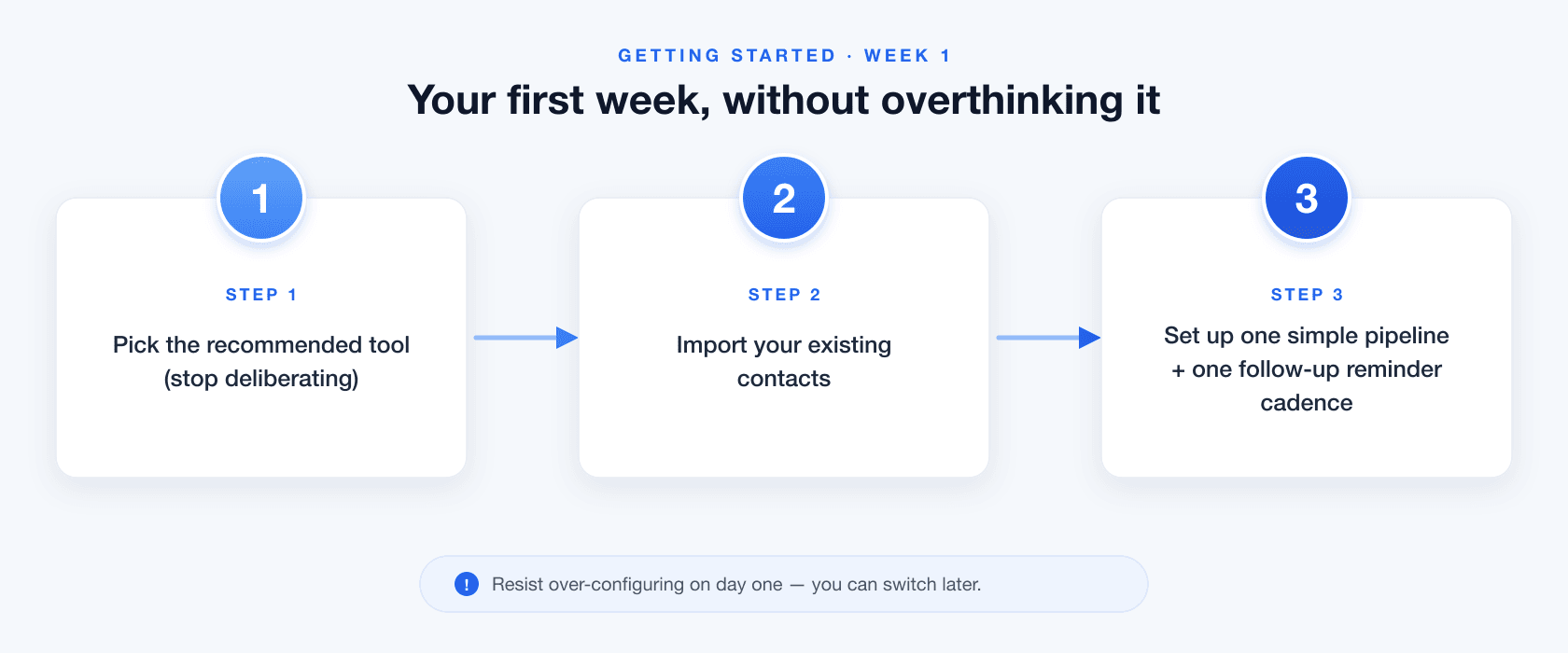
Your first week, without overthinking it — the low-friction onboarding path in order at a glance.
You've got the pick and a three-step plan, so there's no reason to let this slide into next month. Make this the week it actually happens: start a free trial of an all-in-one small-business CRM, import your contacts, and set your first follow-up reminder before you close this tab. Ten minutes now beats another quarter of "I'll get to it."
Frequently Asked Questions
Can I get my client data out later if I decide to switch tools? Yes — and it's worth confirming before you commit to anything. Choosing an all-in-one CRM shouldn't mean locking your records inside it. Look for a tool that lets you export contacts, notes, and files on demand in standard formats (CSV for records, the original files for documents). The whole point of leaving scattered apps behind is to own one clean record of every client; that record should stay yours to take with you.
Is it safe to keep all my client information in one online system? For most small teams, a reputable hosted CRM is safer than the status quo — client details spread across a personal inbox, an unlocked phone, and a shared spreadsheet with no access controls. A dedicated tool centralizes that data behind a login, encrypts it, and backs it up automatically. Before you settle on one, check that it offers encryption, regular backups, and per-person access, so you can control who sees what as people join or leave.
What happens when my team grows past five people? Outgrowing the recommendation isn't a crisis. Most all-in-one CRMs stretch to a few more seats comfortably before the fit changes. The real signal to reassess is what you start needing — pipelines, territories, forecasting, the enterprise machinery this comparison deliberately leaves out. If you've kept your data exportable (see above), moving to a heavier, sales-oriented CRM later is a migration, not a rebuild from scratch.
Do I have to move everything over at once, or can I switch gradually? You can switch gradually, and it's usually the calmer path. Nothing requires a big-bang cutover: bring in your active clients first, keep the old spreadsheet as a read-only archive, and route all new intake into the CRM from day one. Within a few weeks the tool holds everything current and the old files become reference you rarely open — no risky weekend of migrating years of history before you're allowed to start.