The 7-Document Pre-Appointment Checklist
The first appointment does more work than any meeting that follows it. In those opening minutes, before you've said much of anything, a client is quietly deciding whether they trust you — reading your competence, your organization, and whether choosing you was a mistake. That's a lot riding on a session that too often begins with both people scrambling: hunting for an ID, spelling out an address, filling in details that should have been settled days ago.
The costs of that scramble add up fast. First, you lose billable or booked time to intake logistics — minutes that were supposed to be the work itself. Second, the impression suffers; a session that feels disorganized makes you look disorganized, fairly or not. Third, and least forgiving, you expose yourself to compliance and legal trouble when required paperwork is missing or gets handled after the fact.
The fix is almost boringly simple: collect the right documents before the client ever walks in. Do that, and the intake scramble disappears. The first minute becomes real, productive work instead of clerical catch-up.
This article gives you the spine of that preparation — a checklist of seven documents worth gathering ahead of any first appointment. Later sections go further: how to actually use the list, how to customize it for your situation, and how to automate the whole thing.
If you run a clinic, consult independently, manage an agency, or coach clients, none of this is about drowning anyone in forms. It's about starting smoother — and looking, from minute one, like you meant to.
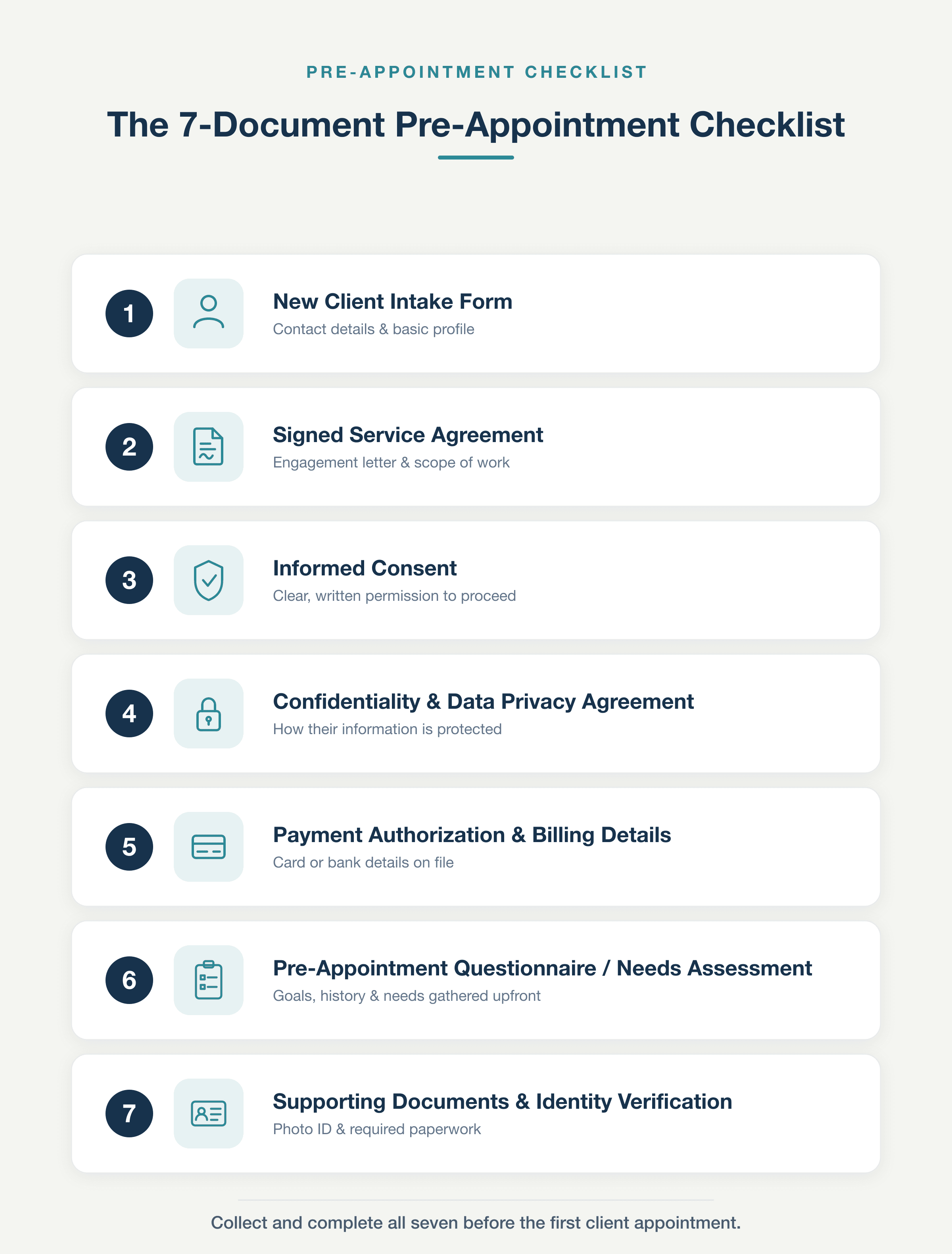
The 7-Document Pre-Appointment Checklist: the full framework of client documents to collect and complete before the first appointment, at a glance.
1. New Client Intake Form
The intake form is the foundation the rest of this checklist stands on—get it right and everything downstream gets easier. A good one captures the basics: who the client is, how to reach them, how they found you, what they're hoping to achieve, and any history that shapes the work ahead. Its job isn't to solve anything yet. It's simply to create a baseline record of the person in front of you before the real work begins.
The payoff comes from collecting it early. When the form lands in your inbox ahead of the appointment, you can read it, think about it, and walk in prepared instead of cold. Skip that step and the first several minutes evaporate on questions the client could easily have answered at home—name, goals, the same ground everyone covers. With those answers already filled in, the conversation opens at a higher, more useful level, right where the value actually is.
Keep the scope modest, though: a handful of fields, not an exhaustive interrogation. If the form feels like a chore, people abandon it half-finished and you lose the very head start you were after. Focused, respectful of their time, easy to complete—treat that restraint as the standard for every item that follows.
2. Signed Service Agreement or Contract
A service agreement is the document that fixes the terms of your engagement before any work begins. It pins down the specifics — scope, deliverables, timelines, fees, and what happens if someone cancels or fails to show. Signing it ahead of the first appointment is what turns those terms into something binding, precisely when a dispute would otherwise leave you with nothing but a verbal memory. That protection is real: a signed contract heads off arguments over what was promised and gives both sides legal footing if things go sideways. A few clauses earn their place every time — scope, payment terms, a cancellation policy, and liability. Scope keeps the work from creeping past what you agreed to; payment terms settle when and how you get paid; the cancellation policy protects your calendar; and liability spells out who carries the risk when something goes wrong. If a contract feels cold, or like you're assuming the worst about a client you've only just met, reframe it. A clear agreement isn't a sign of distrust — it's a sign you've done this before and you take the work seriously. Handled well, the signed document reassures the client as much as it shields you, setting a professional tone a handshake never quite manages.
3. Informed Consent or Terms of Service Acknowledgment
Informed consent is a distinct document that is remarkably easy to confuse with the contract, yet it does entirely different work. Where the contract locks down the commercial relationship, consent captures something narrower and more personal: the client's genuine understanding of the process itself, and their agreement to move forward with its risks fully in view. This is the line worth drawing against the previous section. The contract governs terms — money, timelines, deliverables, and liability. Consent governs the work performed — what you will actually do to or with the client, and what could go wrong along the way.
In regulated fields, obtaining it is mandatory, but its value extends well beyond compliance. A physiotherapist secures consent for the physical treatment and its risks before laying hands on a patient. A financial adviser documents consent for the recommended approach and the market exposures it carries. A coach establishes consent around the method and the expectations it sets, so no one is surprised by how the sessions unfold. In each case, the client is agreeing not to a price, but to a procedure.
That is the cleanest way to hold the two apart: the contract is the client agreeing to pay you, and consent is the client agreeing to what you'll actually do.
4. Confidentiality and Data Privacy Agreement
This document pulls together two closely linked concerns: your confidentiality obligations toward the client, and the client's consent to how you handle their data. The privacy side spells out exactly how their information is stored, what it will be used for, who it may be shared with, and which rights the client keeps over it throughout the engagement. That framing matters because it sits against a real regulatory backdrop — where they apply, frameworks like the GDPR in Europe and HIPAA for health information in the US set binding rules on how personal data is collected and protected.
The practical move is to secure this consent up front, before any sensitive data actually changes hands. Doing so pays off twice over: it signals respect and builds client trust, while at the same time discharging a genuine legal duty you would otherwise be exposed on. A solid agreement should cover the essentials — your storage practices, the permitted uses of the data, clear rules on sharing with third parties, and a plain statement of the client's rights.
Just as important, write it in plain language rather than dense legalese, so clients can actually understand what they are agreeing to. That comprehension is the whole point: a privacy clause only becomes real reassurance when the person signing it truly grasps what it says.
5. Payment Authorization and Billing Details
Payment details belong in the pre-appointment packet, handled well before anyone sits down — not tacked onto the end of the first session when everyone is ready to leave. Depending on your business, this might mean a card kept on file, a deposit toward the booking, insurance information, or a straightforward summary of your billing terms. The immediate payoff is simple: money is settled quietly in advance, so it never has to derail the conversation or force an awkward close when the real work is done. There's a revenue angle too. Collecting before the appointment sharply reduces the risk of finishing the job only to chase an invoice that never gets paid. It also gives teeth to the cancellation clause you set earlier — a no-show policy only works if there's already a payment method on hand to charge against. In practice, this takes a few familiar shapes. A consultant might take a deposit to hold the slot. A studio billing month after month can capture card-on-file authorization for recurring charges. A clinic can run insurance pre-verification so coverage is confirmed before the patient ever walks in. Each version does the same thing: it removes one more piece of friction from the start of the relationship. When payment is squared away up front, it becomes one less thing standing between you and the work you were actually hired to do.
6. Pre-Appointment Questionnaire or Needs Assessment
A needs assessment is a service-specific questionnaire that digs well beyond the basics a standard intake form collects. It asks clients to spell out their goals, describe their current situation, rank their priorities, and share the history that's relevant to the work ahead. The distinction matters: an intake form tells you who the client is, while a needs assessment tells you what they actually need. That shift is where the value lives. When you review the responses before the appointment, you arrive with a plan already in hand instead of spending the first meeting fishing for context.
The questions naturally vary by trade. A personal trainer might ask about fitness goals, current fitness level, past or present injuries, and preferred training styles. A marketing consultant would focus on business objectives, the channels already in use, available budget, and what's been tried before. A tutor might probe subject goals, the student's current level, specific problem areas, and how the learner absorbs material best.
Each version pulls the same thread — surface the details that let you prepare rather than react. A completed assessment changes the character of that first session entirely. Instead of opening with discovery questions you could have answered days earlier, you open with progress, moving straight into the work the client came for, and the client feels that momentum from the very first minute.
7. Supporting Documents and Identity Verification
The last category isn't a single form you can print and forget—it's whatever case-specific material your particular engagement happens to require. Depending on the service, that range stretches widely: a photo ID, an insurance card, prior records from an earlier provider, brand assets like logos and style files, or site photos that show the space you're working with. The practical stake here is easy to underestimate. When one of these pieces is missing at the start of an appointment, the whole session often stalls into a same-day reschedule—an outcome that wastes your time, the provider's time, and any slot someone else could have used.
Identity verification deserves a separate mention, because it's both simply good practice and, in certain fields, an outright regulatory requirement. It matters most in regulated or high-trust engagements—financial, legal, medical, or anything where a provider is obligated to confirm exactly who they're dealing with before proceeding. That's not bureaucratic friction; it protects both sides.
What sets this item apart is variability: it shifts more from one industry to the next than anything else on this list, so no universal checklist can capture it. The right move, then, is to treat this category less as a fixed demand and more as a prompt—a cue to ask, ahead of time, what your specific service actually needs from you, rather than assuming a one-size-fits-all answer applies.
Knowing what to gather is only half the job—the other half is collecting it in a way that doesn't bury a brand-new client under a stack of forms before you've even met. Here the guiding principle is simple: sequence and timing matter just as much as the documents themselves. Not everything needs to arrive at once. Some items belong at the moment of booking—basic contact details, a signed agreement—while others, like intake questionnaires or prep instructions, land more naturally a few days before the appointment, when the client is actually thinking about it.
Rather than trickling out separate requests, bundle everything into a single onboarding packet. Give the client one link and one deadline, so they can sit down once, work through it, and be done—no scattered emails to hunt for later. Keep the tone friendly, and state the reason behind each request as you go. That last part isn't a nicety; people complete forms far more readily when they understand why a piece of information is needed, instead of feeling like they're filling in blanks for their own sake.
Finally, store every completed document in one place, filed under that client's name. Central storage isn't just tidy—it feeds directly into your own preparation. When it's time to serve them, you're not digging through inboxes or shared drives; everything for that client sits in a single, findable spot, ready the moment you need it. Collect gently, explain as you go, and keep it all together.
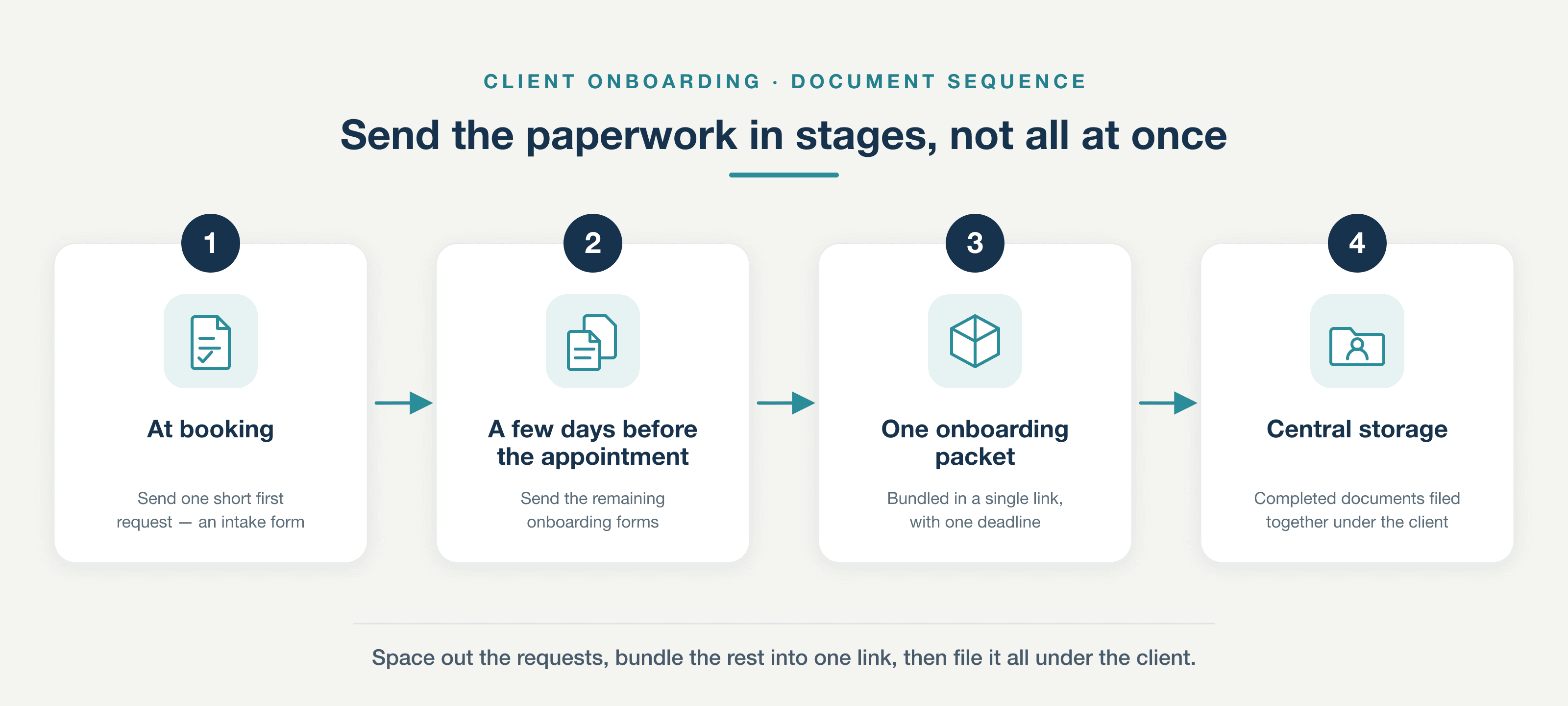
Send the paperwork in stages, not all at once: space out the requests, bundle the rest into one link, then file it all under the client.
Before your next client books, give yourself a small head start: run back through the seven documents above, flag the ones your service actually calls for, and pull them into a single packet you can hand out every time. It takes a few minutes today, and it saves you the frantic scramble of chasing paperwork mid-intake down the line. Think of it as the groundwork that comes first — the version you'd want in place long before you start wondering how to automate any of it.
Tailored, Not Templated
Treat the seven-document set as a starting point, not a fixed prescription you're obligated to follow line by line. The core documents tend to look similar from one business to the next, but where the weight falls changes with the field you work in. A clinic, for instance, leans hard on consent forms and privacy notices — those carry the relationship and the liability. A law firm reorders the same instinct around a clear scope of engagement and confidentiality terms that come first. Shift industries again and the priorities move with you: a design agency puts brand assets, style references, and a tight creative brief up front, while a financial advisor can't move until identity verification and regulatory disclosures are handled first. So adapt the list to fit. Add a document the standard set overlooks, drop one that never applies to your work, and reorder the sequence so the most consequential pieces reach the client first. Three variables drive those decisions: the type of client you're onboarding, the tier of service they've bought, and the regulatory requirements your industry imposes. Read those three honestly and the right shape of your onboarding pack tends to reveal itself. Once the list is tailored to your world, though, a different problem takes over — not what belongs in the pack, but how you run the same sequence consistently, client after client, as the volume grows.
Do all of this by hand and you'll find it's exactly where an otherwise solid process starts to quietly come apart. The manual version is a grind: you chase the same reminder email three times, wait on a document that has to be printed, signed, scanned, and sent back, then hunt for the final copy across an inbox, a shared drive, and someone's desktop folder — and half the time the client still arrives having forgotten the paperwork entirely. Automation takes each of those frictions off the table. Instead of piecemeal requests, one link hands the client the entire onboarding packet in a single place. Their answers file themselves into the right record automatically, so nobody sits there sorting attachments by hand. Signatures happen right in the browser, which does away with the print-and-scan step altogether. Everything lands in one central store, and a single view shows you at a glance what's still outstanding and who you're waiting on. The payoff shows up fast: hours you no longer spend on follow-up, noticeably fewer no-shows because clients turn up prepared, and compliance that stays consistent for every single client rather than depending on who remembered to ask. None of this hinges on a particular brand or platform — the point is simply that the whole sequence, from first request to signed and stored, can run as one connected flow. Which raises the obvious question of whether a single tool could handle all of it end to end.
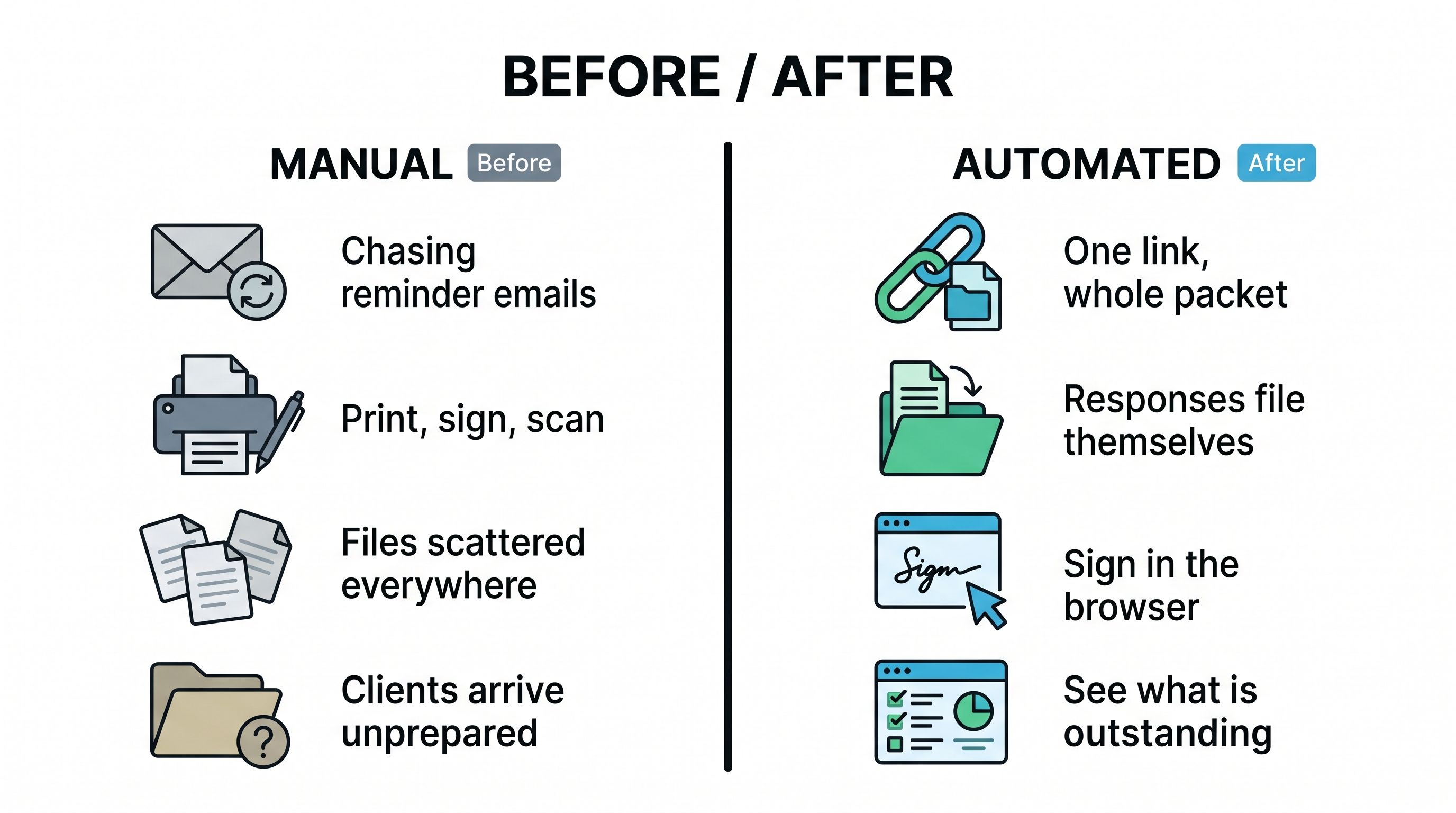
Manual vs. automated client onboarding: chasing emails, print-sign-scan, and scattered files give way to one link, self-filing responses, in-browser signatures, and an at-a-glance view of what's outstanding.
One Place for the Whole Workflow
Pocper closes the gap between collecting, signing, and storing by pulling all three into a single place, so onboarding paperwork stops scattering across email threads, PDF tools, and shared drives. At its core are reusable templates you build in a block editor: you assemble each intake form, consent, or agreement once, then reuse it for every new client instead of rebuilding it from scratch. If you'd rather not start from a blank page, the template library spans 41 industry categories, giving you a close-enough starting point to tailor to your own wording and fields.
Delivery is just as light. Each document goes out as a single link or QR code, and the client fills it in from any browser — no app to download and no account to create. As their responses come back, they file themselves straight into that client's folder, so nothing sits in an inbox waiting to be sorted. When a signature is needed, the client draws it in the browser, and it locks in place once they confirm, leaving a clean, finished record rather than a half-signed draft.
Throughout, you keep an at-a-glance view of where every client stands, so you can see what's already complete and what's still open without chasing anyone one by one. Put together, that's what lets you walk into the first appointment fully prepared: the forms filled, the signatures captured, and the whole file organized in one spot — the collect-sign-store loop handled before the client ever sits down across from you.
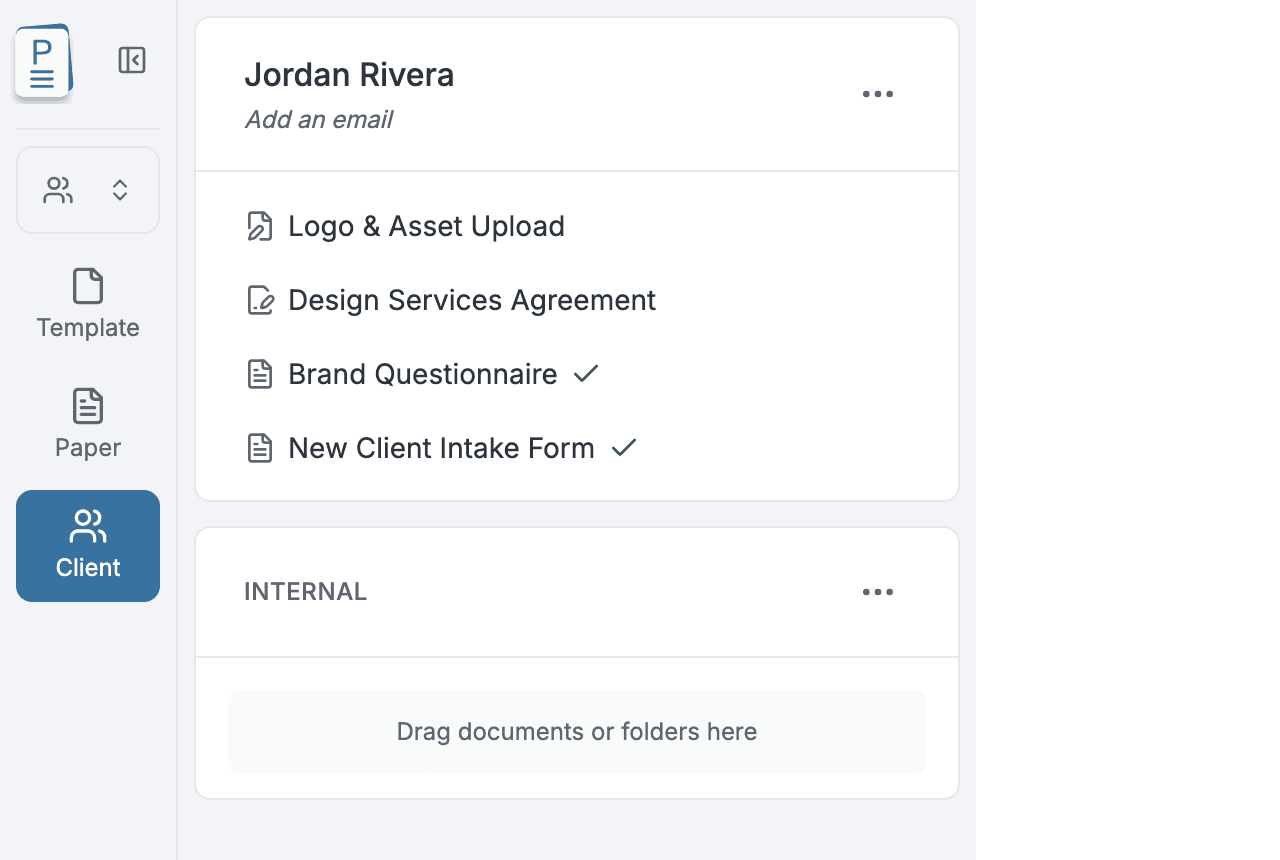
A single client folder in Pocper — every onboarding document gathered in one place, with completed forms marked by a green check and outstanding items left unchecked.
Everything comes back to a single habit: getting ready before the first appointment rather than during it. When you gather all seven documents ahead of time, you close the legal and financial gaps that quietly expose a business to risk long before any work begins. That same preparation lets the opening session start with real progress instead of paperwork, so the very first minute is spent on the client's goals rather than chasing signatures. It also shapes the impression that matters most — the one formed in those earliest moments, when a smooth, confident intake tells the client they are working with a professional. The deeper advantage is structural: a process that is written down, tailored to how you actually work, and backed by automation is a process that holds up as your client list grows. What runs cleanly for the next new client will run just as cleanly for the hundredth. So take the checklist you have here, wire it into your intake automation, and put it to work on the very next relationship you begin. Prepared is not a feeling you hope for on the day — it is a system you set up in advance.
Ready to make "fully prepared" your default? Build your onboarding packet in Pocper. Assemble each document once as a reusable template, then share the whole set as a single link or QR code your client can fill in from any browser — no account to create, nothing to download. Every response and in-browser signature files itself into one client folder, so a single glance tells you what's done and what's still outstanding. Set up your first onboarding packet today, and walk into your next first appointment already ready to work.
Frequently Asked Questions
What should I do if a client shows up without completing the paperwork?
Keep a short in-session fallback for the items that carry legal and financial risk — identity verification, consent, and payment authorization — because those can't safely be deferred. For everything else, such as a detailed needs assessment, a gentle reminder with the reason attached and a firm deadline before the booking usually does the job, especially if the packet is quick enough that finishing it never feels like a burden. If a client repeatedly ignores requests, treat that as a signal to confirm the appointment is still on rather than pressing ahead unprepared.
How long should I keep completed client documents on file?
Retention depends on your jurisdiction and field. Signed contracts and consent forms are often kept for several years after an engagement ends in case of a dispute, and regulated sectors — health, legal, financial — typically have explicit statutory minimums. Personal data is the opposite case: under frameworks like the GDPR you shouldn't hold it longer than you have a lawful reason to, so set a retention period, state it in your privacy agreement, and delete the data once that purpose has passed. When in doubt, check the specific rules for your industry and location.
Is it safe to keep a client's card or payment details on file?
It can be, but only when the details are handled through a payment processor that stores them in compliant, tokenized form — not in a spreadsheet, an email, or a note. Holding raw card numbers yourself creates security and PCI-compliance exposure you don't want. Always capture explicit written authorization for what you'll charge and when; that's what makes a card-on-file arrangement both lawful and enforceable if a client cancels or fails to show.